Payment initiation and real-time bank data in one workflow.
Open Banking infrastructure for accounts payable invoice processing in accounting SaaS and ERP platforms.
Accounts payable invoice processing involves receiving, approving, paying, and reconciling supplier invoices. Most AP systems handle the first two steps well.
The invoice payment process breaks at the third step – payment execution – and the fourth step – reconciliation – is only as accurate as the data that follows it.
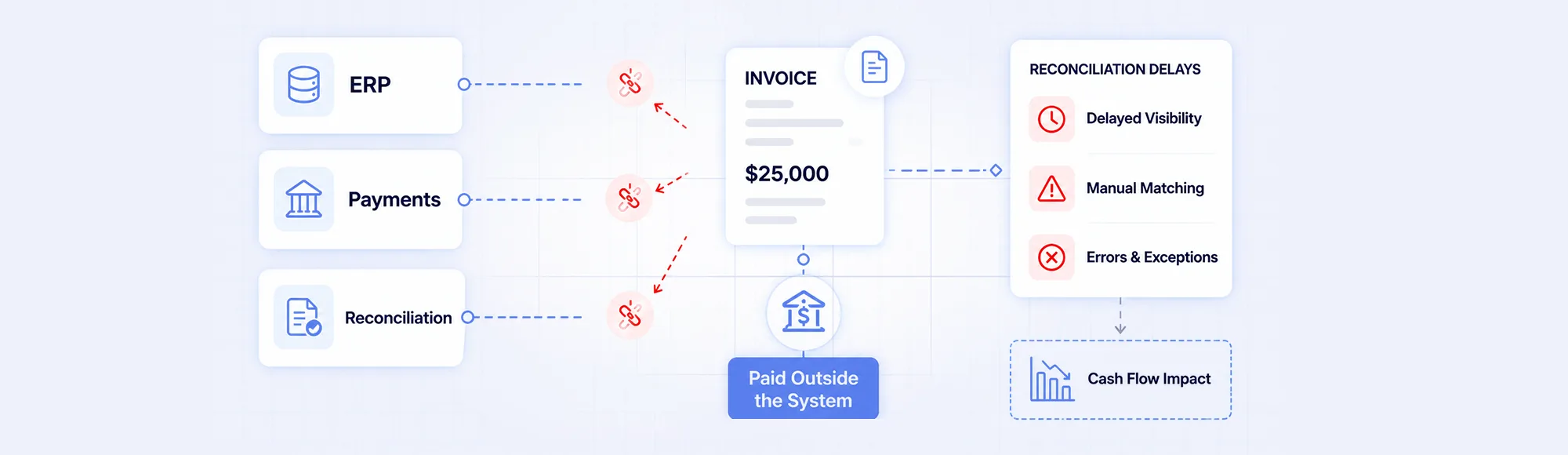
The structural problem is well established: the ERP manages invoices and approvals, but payment execution moves outside the system. The bank executes the payment. Data flows back into the ERP later, via bank statements, when real-time visibility is no longer possible.
UK Open Banking infrastructure processed 2.54 billion API calls in March 2026 alone – yet most accounts payable invoice processing workflows still execute payments outside the system and reconcile against delayed bank data.
TL;DR
Accounts payable invoice processing breaks when invoices, payments, and bank data are managed in separate systems with no real-time connection. The invoice payment process becomes more efficient when payment initiation happens within the workflow – via Pay by Bank or Payment Links – and bank transaction confirmation arrives in real time via webhook. Finexer provides payment initiation (PIS) and bank transaction data (AIS) that connects the payment execution and reconciliation steps for accounting SaaS, ERP, and finance ops platforms.
Key Takeaways
What is accounts payable invoice processing?
Accounts payable invoice processing is the end-to-end workflow of receiving a supplier invoice, validating it, obtaining approval, executing payment, and confirming settlement in the accounting record. The invoice payment process is complete only when payment is confirmed and matched to the original invoice – closing the loop between the obligation and the settlement.
Where does the invoice payment process break in practice?
At payment execution. The invoice sits in the ERP. The approval is complete. But payment typically exits the system – via a manual bank transfer, a card payment, or a file export to a banking portal. The ERP does not know the payment has been made until a bank statement arrives. That delay – between payment execution and ERP confirmation – is where reconciliation errors accumulate.
What causes delays in accounts payable invoice processing?
Four disconnections create the delay:
- Payment executed outside the system – bank transfers initiated manually through a banking portal, with no real-time return signal to the ERP
- No payment reference embedded – manually initiated payments often arrive without structured invoice references, breaking automated matching
- Delayed bank data – bank statements update daily or weekly, creating a lag between payment and confirmed settlement
- Fragmented tools – invoice management, payment execution, and reconciliation handled by separate systems with separate data formats
Why Does the Invoice Payment Process Disconnect at Execution?
What Happens Between Invoice Approval and Reconciliation?
Most accounting SaaS and ERP platforms manage the invoice well. Capture, validation, three-way matching, approval workflows – these steps are handled in the system.
The gap opens when the approved invoice moves to payment. Three common paths – all exit the ERP:
- Manual bank transfer: Finance team logs into the banking portal separately. Payment leaves the bank. ERP is not notified – reconciliation relies on the next bank statement.
- Card payment: Settlement takes 2-3 days. Structured invoice reference rarely carries through to the transaction record. Card fees apply per transaction.
- BACS batch export: Invoice data exported from ERP, uploaded to banking portal manually. 3 working day settlement. Confirmation returns as a batch – not per-invoice.
In all three cases, the ERP does not receive real-time confirmation. Reconciliation depends on delayed data.
| Payment Method | Settlement | Reference Carries Through | ERP Confirmation |
|---|---|---|---|
| Manual bank transfer | Instant (Faster Payments) | Depends on manual entry | Next bank statement only |
| Card payment | 2-3 days | Rarely | Card statement, delayed |
| BACS batch | 3 working days | Batch only, not per-invoice | Batch file, not real-time |
| Pay by Bank (Open Banking) | Instant (Faster Payments) | Yes – embedded at initiation | Real-time webhook per payment |
“The accounts payable invoice processing gap is not in invoice management. ERP systems handle that well. The gap is at payment execution – when the invoice leaves the system and the ERP goes blind until the next bank statement arrives.” – Ravi, Finexer
Best automated invoice processing tools for accounting platforms covers how invoice capture, approval, and processing automation works for accounting SaaS and ERP platforms.
What Is the Operational Impact of a Disconnected Invoice Payment Process?
How Does Payment Disconnection Affect Accounting SaaS and ERP Workflows?
The disconnection between payment execution and ERP confirmation creates operational drag across four areas.
- Reconciliation delays: Payments made outside the ERP are not confirmed until bank statement data arrives. Finance teams manually match payment transactions to invoice records at month-end, creating the primary bottleneck in period close.
- Cash flow visibility gaps: The ERP shows invoices approved for payment but not which payments have cleared. Cash flow reporting is based on projections, not confirmed transactions.
- Late payment exposure: Under the UK Late Payment of Commercial Debts Act 1998, businesses can claim statutory interest on invoices not paid within agreed terms – 30 days for public sector, 60 days for private. Disconnected workflows create late payment exposure.
- Supplier payment disputes: When payment references do not carry through, suppliers cannot match incoming funds to invoices. Queries consume time and delay downstream reconciliation.
Duplicate invoice detection for accounting and ERP platforms covers how disconnected AP workflows create duplicate payment risk and how structured payment data reduces it.
How Does Open Banking Connect the Invoice Payment Process?
What Does Pay by Bank Add to Accounts Payable Invoice Processing?
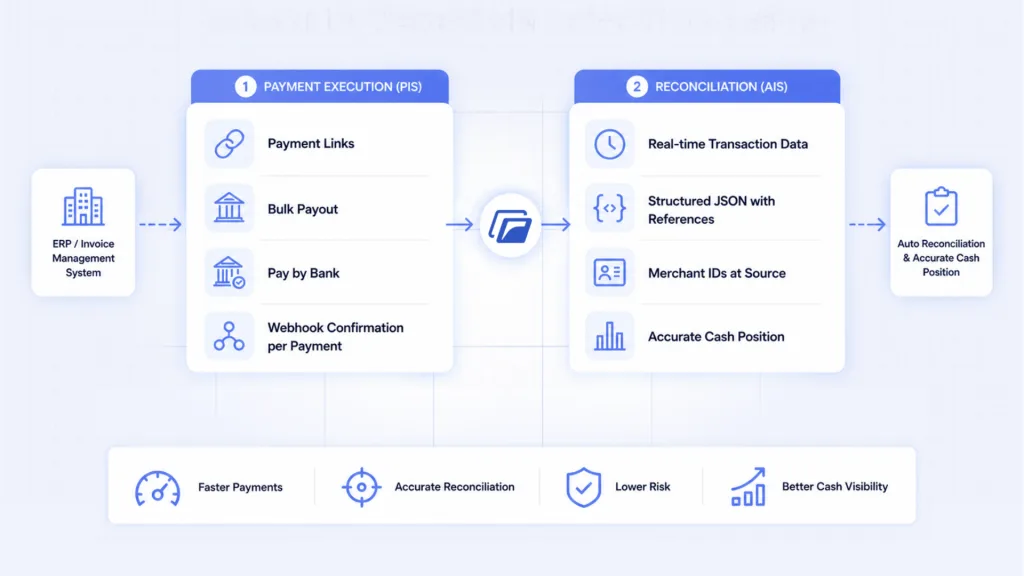
Open Banking payment initiation connects the invoice approval to payment execution within the same workflow – without the payment leaving the system.
Payment Links for supplier invoice settlement:
- Payment Link generated at invoice approval stage
- Supplier or finance team initiates payment via authenticated bank flow
- Invoice reference embedded in the payment instruction at initiation
- Faster Payments settles instantly
- Webhook confirmation returns to the ERP immediately – payment confirmed, invoice matched
Bulk Payout for high-volume AP payments:
- Batch supplier payments initiated via single API call
- Each payout carries a structured reference per recipient
- Payments settle via Faster Payments
- Per-payment webhook confirms each settlement individually
Real-time AIS bank data for reconciliation:
- Transaction data arrives per payment via webhook – not in a daily batch
- Structured merchant IDs and category codes eliminate manual classification
- Invoice reference travels with the payment – automated matching at the accounting layer
- Cash position always reflects confirmed settlements, not pending transactions
“When payment initiation moves inside the workflow and confirmation returns in real time, the accounts payable invoice processing loop closes automatically. The manual reconciliation step – matching the bank statement to the invoice – is replaced by structured data that arrives at the moment of settlement.” – Ravi, Finexer
How Does Finexer Support Accounts Payable Invoice Processing?
What Does Finexer Provide for the Invoice Payment Process?
Finexer does not replace ERP systems or invoice management tools. It provides payment initiation and bank transaction data for the payment execution and reconciliation steps of the accounts payable invoice processing workflow.
Payment initiation (PIS) – for payment execution:
- Payment Links – generated at invoice approval, initiated via authenticated bank flow, reference embedded at initiation
- Bulk Payout – high-volume outbound supplier payments via single API call, per-payment references, Faster Payments settlement
- Pay by Bank – direct A2A payment, instant settlement, zero chargebacks
- Webhook confirmation per payment – real-time settlement status returned to the workflow immediately
Bank transaction data (AIS) – for reconciliation:
- Real-time transaction data per payment – no batch delay
- Structured JSON with payment references – automated invoice matching
- Merchant IDs at source – consistent counterparty identification across payment channels
- Cash position always reflects confirmed cleared transactions
Usage-based pricing, no setup fees. 3-5 weeks to production with active onboarding support.
Finexer payroll and invoicing use case covers how Finexer’s PIS and AIS support invoice payment workflows for billing and finance ops platforms.
Finexer accounting and ERP use case covers how Finexer’s bank data and payment initiation integrate with accounting SaaS and ERP workflows.
What I Feel
Accounts payable invoice processing gets better tools every year.
Better OCR. Better approval workflows. Better ERP integration.
The invoice capture problem is largely solved. The payment execution problem has not moved.
The ERP still goes blind at the point of payment. The reconciliation step still depends on delayed bank statements.
Payment initiation inside the workflow changes this. One webhook per payment. Reference embedded at initiation. The AP loop closes at the moment of settlement – not days later.
Common Use Cases
Accounting SaaS
Supplier invoice payments initiated via Payment Links carry the invoice reference through Faster Payments to the bank. Webhook confirmation returns immediately. Reconciliation is triggered automatically – no manual bank statement matching required.
ERP Platforms
High-volume supplier payment runs executed via Bulk Payout – single API call, per-payment references, instant settlement. Real-time transaction data confirms each payment individually. Period-end cash position reflects confirmed cleared transactions, not scheduled payments.
Finance Ops and Payroll Systems
Outbound payments to multiple recipients – suppliers, contractors, payroll – initiated and confirmed in a single structured flow. Each payment carries a reference. Confirmation arrives per transaction. Reconciliation overhead at month-end is reduced to exceptions, not routine matching.
What is the difference between accounts payable and invoice processing?
Accounts payable is the function managing what a business owes to suppliers. Invoice processing is the specific workflow within AP – receiving, validating, approving, paying, and reconciling supplier invoices. Invoice processing is a sub-process of AP. Most AP systems automate invoice capture and approval well. The payment execution and reconciliation steps are where the workflow typically breaks.
How long does the invoice payment process take in the UK?
Under the UK Late Payment of Commercial Debts Act 1998, payment terms are 30 days for the public sector and 60 days maximum for private sector contracts. In practice, delays in payment execution and reconciliation extend beyond agreed terms. Manual bank transfers settle instantly via Faster Payments but take days to confirm in the ERP without real-time bank data integration.
How does Pay by Bank improve accounts payable invoice processing?
Pay by Bank via Open Banking initiates payment directly within the AP workflow with the invoice reference embedded at initiation. Settlement happens instantly via Faster Payments. A webhook confirmation returns to the ERP immediately – the invoice is matched and closed at the moment of settlement, not when the next bank statement arrives.
Connect your invoice payment process end-to-end with payment initiation and real-time bank data.
About the Author

Ravi Ranjan
Ravi Ranjan is Co founder & CEO of Finexer