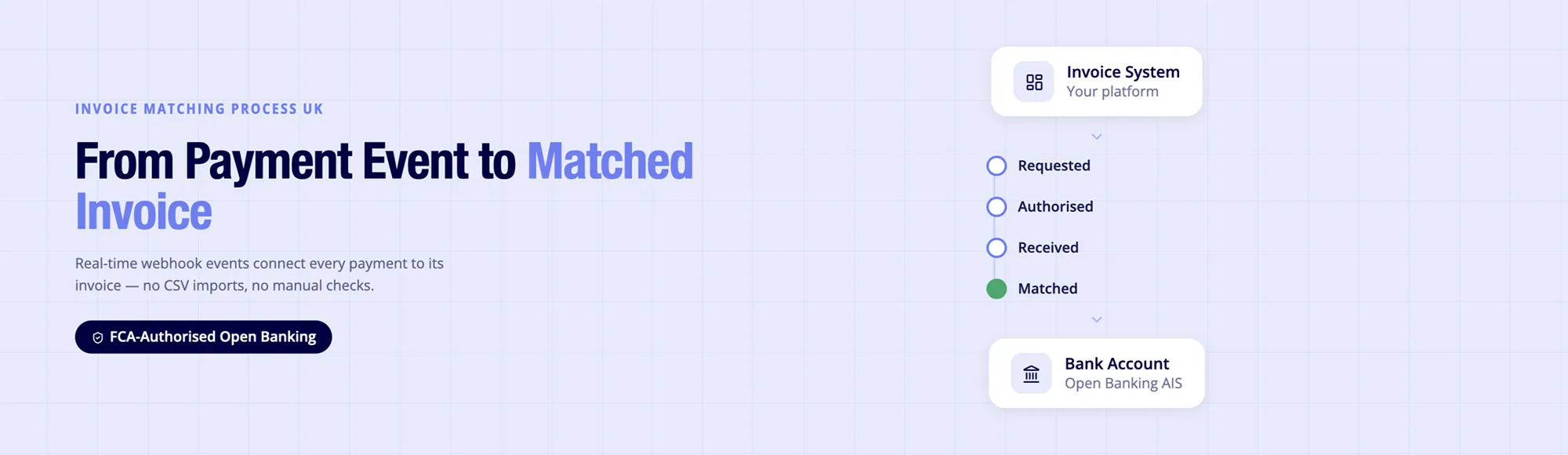
Real-Time Invoice Matching. One API.
See how Finexer’s OB Invoice Tracker delivers real-time invoice payment status and matching through Open Banking.
Getting paid is only half of the reconciliation process. The other half is knowing, quickly and accurately, which invoice that payment settles. As transaction volumes grow, delayed bank feeds, CSV imports and manual reconciliation create a visibility gap between payment settlement and invoice status.
This guide explains how the invoice matching process works, why traditional reconciliation slows finance operations, and how Open Banking Account Information Service (AIS) and Payment Initiation Service (PIS) provide the real-time payment and bank transaction data that modern accounting, ERP and invoicing platforms need to automate matching invoices to payments.
TL;DR: The invoice matching process links incoming bank transactions to outstanding invoices. Traditional matching often depends on CSV imports or periodic bank feeds, leaving finance teams waiting to confirm payments that have already arrived. Open Banking changes this by combining Payment Initiation Service (PIS) and Account Information Service (AIS), allowing platforms to receive payment events and bank transaction confirmations in real time.
Stop Chasing Invoices That Have Already Been Paid
Every finance team has seen it happen.
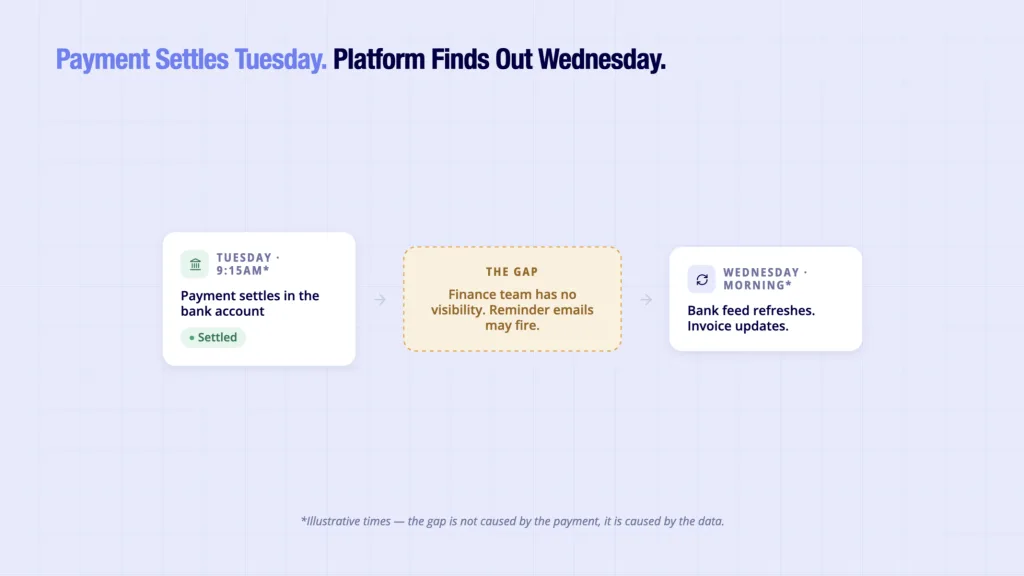
A customer pays an invoice on Tuesday morning. The money reaches the bank account. Yet on Wednesday the accounting platform still shows the invoice as outstanding. Reminder emails are sent, support tickets are opened, and someone spends half an hour investigating a payment that already exists.
The invoice is not the problem.
The payment is not the problem either.
The real issue is the delay between when money reaches the bank account and when the platform knows it has arrived. That delay makes the invoice matching process slower than it needs to be and turns matching invoices to payments into unnecessary manual work as transaction volumes grow.
At Finexer, we work with UK accounting platforms, ERP systems, payroll providers and invoicing software integrating regulated Open Banking infrastructure into payment and reconciliation workflows. Across these implementations, one operational pattern appears repeatedly: payments often settle before the platform receives updated bank information.
This guide explains how the invoice matching process works, why traditional reconciliation creates visibility gaps, and how Open Banking changes the underlying payment and bank data flow. It is written for product managers, finance leaders and engineering teams evaluating modern reconciliation workflows rather than consumer accounting software.
Ravi, Head of Platform Partnerships at Finexer, says:
“Engineering teams should evaluate payout and reconciliation infrastructure by the quality of its events rather than its dashboards. Reliable webhooks, structured bank data and deterministic APIs eliminate far more operational work than another reporting screen ever will.”
What Is the Invoice Matching Process?
The invoice matching process is the workflow that links an incoming payment to the invoice it settles.
The objective is straightforward: when money arrives, the platform must determine which invoice that payment belongs to.
Most invoice matching systems rely on three core data points:
- Payment amount
- Payment reference
- Counterparty information
When these elements align with an open invoice, the system marks the invoice as paid.
At small transaction volumes, this can be handled manually. At higher volumes, automation becomes necessary because finance teams cannot realistically inspect every incoming transaction individually.
Why Does Matching Invoices to Payments Become Difficult at Scale?
Matching invoices to payments becomes more difficult as transaction volume increases.
A business processing 20 invoices each month can usually reconcile payments manually. A platform processing 20,000 invoices each month cannot.
The challenge is not typically invoice creation or payment collection. The challenge is visibility between those two events.
By the time a finance team receives updated bank data:
- Payment may already have settled
- Customers may already have received reminders
- Collections workflows may already have triggered
- Customer support may already be investigating the payment
The result is operational work that exists solely because payment information arrives too late.
As Ravi, Head of Platform Partnerships at Finexer, explains:
“The invoice is often not the problem. The payment is not the problem either. The gap is visibility. Platforms know when an invoice is issued and banks know when money arrives. The operational challenge sits between those two events.”
How Does Traditional Invoice Matching Work
Most accounting and invoicing platforms follow a similar reconciliation process.
Step 1: Invoice Creation
The platform creates an invoice and records:
- Invoice number
- Customer details
- Amount due
- Due date
The invoice status becomes “Open”.
Step 2: Customer Makes Payment
The customer pays using:
- Bank transfer
- Card payment
- BACS payment
- Pay by Bank
The payment is sent to the receiving account.
Step 3: Bank Feed Updates
The accounting system waits for:
- Scheduled bank feed refresh
- CSV import
- Statement upload
- ERP synchronisation
This may occur hours later or even the following day.
Step 4: Matching Rules Run
The platform attempts to match:
- Amount
- Reference
- Counterparty
against outstanding invoices.
Step 5: Invoice Status Updates
If matching succeeds, the invoice moves from Open to Paid.
If matching fails, manual review is required.
The weakness in this workflow is clear: payment settlement and invoice status updates are often separated by hours.
What Causes Invoice Matching Failures?
Several common issues disrupt reconciliation workflows.
Missing References
Customers occasionally omit invoice numbers when making payments.
Without a matching reference, automated payment reconciliation becomes more difficult.
Partial Payments
A customer may pay only part of an invoice.
The amount no longer matches the expected value.
Overpayments
A payment exceeds the invoice value, creating an exception that requires review.
Multiple Outstanding Invoices
When customers have several open invoices, identifying the correct destination for a payment becomes more complex.
Delayed Bank Data
Even when references and amounts are correct, delayed bank feeds postpone reconciliation.
This remains one of the largest operational bottlenecks for many finance teams.
How Open Banking Changes the Invoice Matching Process
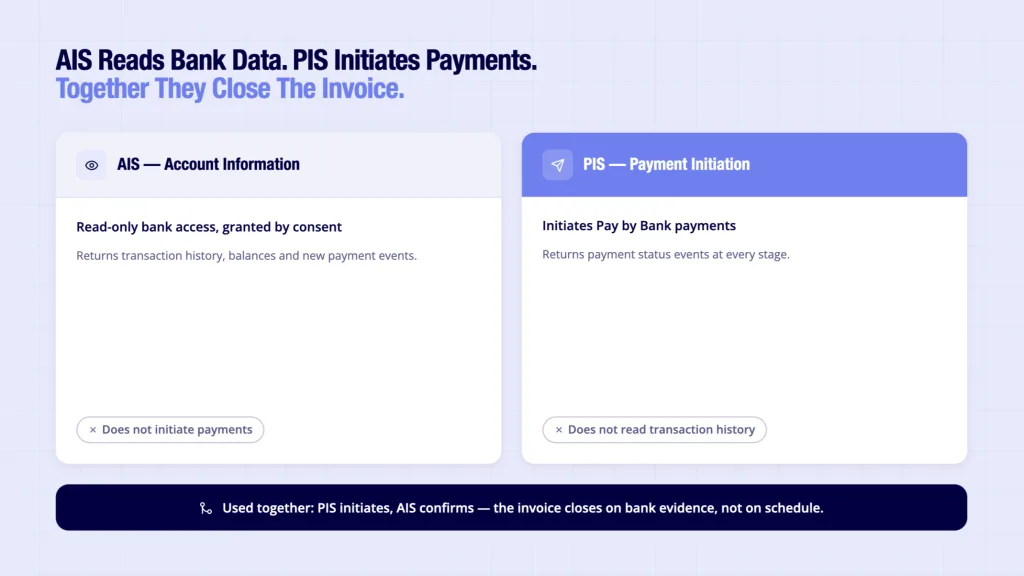
Open Banking changes the timing of reconciliation. It also forms the regulated data layer behind automated payment reconciliation UK, allowing finance platforms to reconcile payments using live bank transaction data instead of delayed statement imports.
Instead of waiting for bank data to arrive later, platforms can receive information directly from banks through APIs.
It is important to understand the distinction between the two Open Banking services involved.
Account Information Service (AIS)
AIS provides read-only access to bank account information with customer consent.
AIS can retrieve:
- Transaction history
- Account balances
- Account details
- New transaction events
AIS does not initiate payments.
Payment Initiation Service (PIS)
PIS initiates payments directly from a bank account after the customer authorises the payment.
PIS can:
- Create Pay by Bank requests
- Initiate account-to-account payments
- Return payment status updates
PIS does not retrieve transaction history.
Using AIS and PIS together creates a more complete invoice tracking workflow.
How Does Open Banking Improve Matching Invoices to Payments?
Open Banking improves matching invoices to payments by replacing delayed bank feeds with regulated API connections.
Instead of waiting for scheduled imports, platforms can receive payment events and bank transaction updates as they occur. This gives finance teams earlier visibility into payment progress and reduces the time between settlement and reconciliation.
The result is not that accounting software changes its ledger. Rather, the data underneath the ledger becomes more current.
How Finexer’s OB Invoice Tracker Supports the Invoice Matching Process
Finance teams managing high invoice volumes need more than invoice creation and payment collection. They need confirmation that the payment has actually reached the receiving account and which invoice it settles.
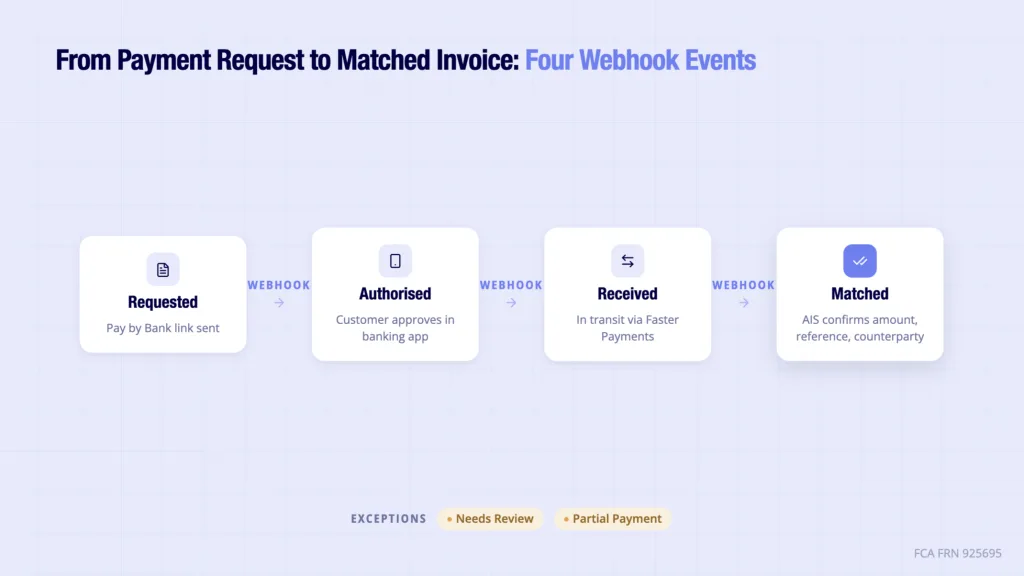
Finexer’s Open Banking Invoice Tracker combines Open Banking Payment Initiation Service (PIS) and Account Information Service (AIS) to provide the regulated event layer underneath accounting platforms.
The platform continues to own the user interface, invoice logic and accounting records. Finexer supplies the payment events and bank transaction data that enable faster reconciliation.
The process works as follows:
- The platform creates an invoice.
- A Pay by Bank payment request is generated using PIS.
- The customer authorises payment inside their own banking app.
- PIS returns payment status tracking events as the payment progresses.
- Finexer AIS real-time bank data monitors the receiving bank account.
- When the payment arrives, AIS returns the matching transaction.
- The platform automatically updates the invoice status.
Instead of relying on a later CSV export, the platform receives structured payment information throughout the payment lifecycle.
Relevant capabilities
- Invoice-linked Pay by Bank payment requests
- Payment status webhooks: Requested, Authorised, Submitted and Received
- AIS transaction monitoring for payment confirmation
- Exception states including Partial Payment, Overpayment, Failed, Expired and Needs Review
- Audit trail for every payment object
- FCA-authorised AISP and PISP (FRN 925695)
- Almost all UK banks covered
- Transparent pricing
- White-label deployment
- 3 to 5 weeks onboarding support
Traditional Invoice Matching vs Open Banking
| Stage | Traditional Process | Open Banking Process |
|---|---|---|
| Payment initiated | Bank transfer or card | Pay by Bank via PIS |
| Payment visibility | After bank feed refresh | Payment events returned during the payment journey |
| Bank confirmation | CSV import or scheduled feed | AIS transaction confirmation |
| Invoice update | Hours later or next day | Updated immediately after matching logic receives the transaction |
| Manual reconciliation | Frequently required | Reduced through structured payment data |