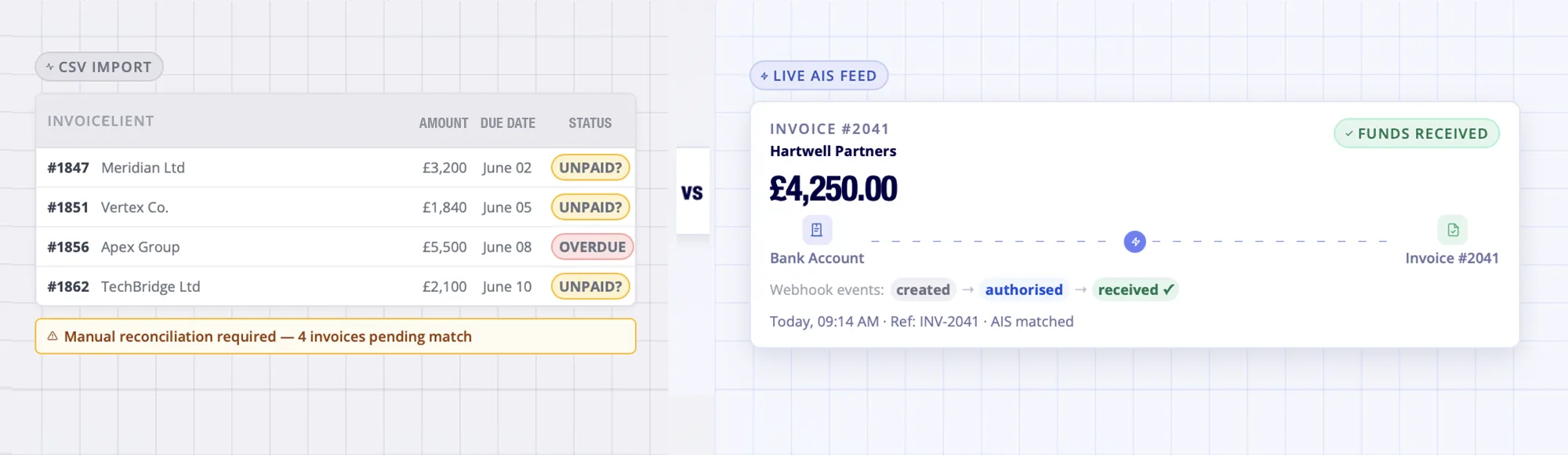
Track Invoices From Request to Receipt.
Finexer’s OB Invoice Tracker connects invoice records with Pay by Bank, bank transaction data and webhook status updates.
TL;DR
An invoice tracker monitors payment status from issued to received. The gap is timing: invoice in one system, payment confirmed hours or days later in another. Finexer’s OB Invoice Tracker – also called the Finexer Invoice Reconciliation Tracker – closes this gap with live AIS bank feeds, Pay by Bank initiation, and signed webhook events at every status change, from Request through to Matched. The platform builds the invoice workflow. Finexer provides the regulated bank data and payment layer underneath.
What Is an Invoice Tracker?
An invoice tracker records the current status of every issued invoice: sent, paid, partially paid, overdue, or disputed.
At small volume, a spreadsheet works. At platform scale, the tracker is a feature built into the product – and the question becomes where the bank data comes from and how fast it arrives.
The Finexer Invoice Reconciliation Tracker connects both sides. Invoice records link to Pay by Bank payment requests. AIS reads the receiving bank account directly. Status updates on the bank event, not the import schedule.
What Are the 4 Types of Invoice Tracker?
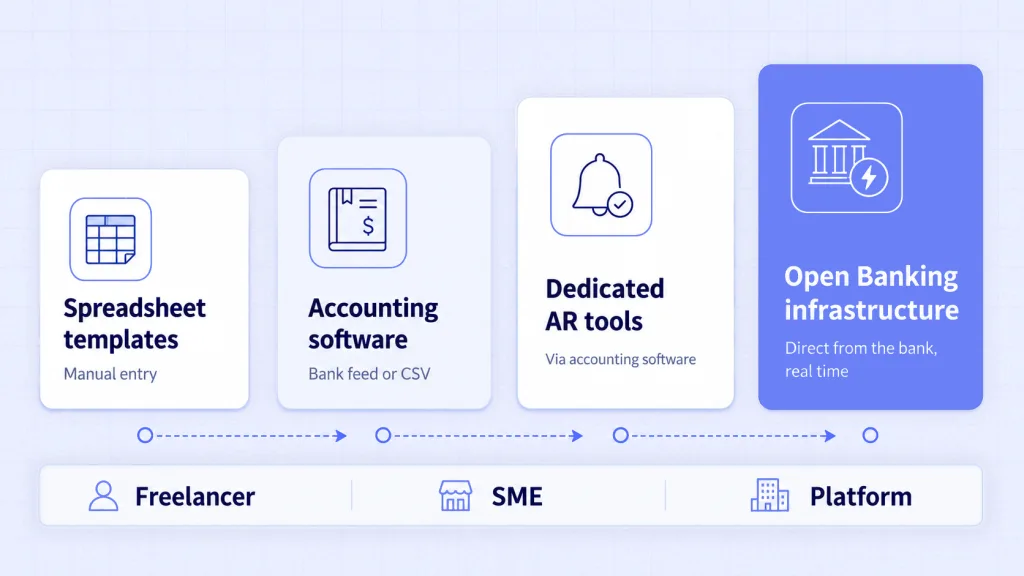
The UK market splits into four approaches, and the right one depends entirely on volume and who is doing the tracking.
| Type | Examples | Bank data source | Best for |
|---|---|---|---|
| Spreadsheet templates | Excel, Google Sheets, Notion | Manual entry | Freelancers, very small businesses |
| Accounting software embedded | Xero, QuickBooks, Sage, FreeAgent | Bank feed or CSV import | SMEs with moderate invoice volume |
| Dedicated AR tools | Chaser, Satago, Upflow, Sidetrade | Via accounting software | Growing AR teams, B2B SaaS |
| Open Banking infrastructure | AIS feed + webhooks (Finexer) | Direct from the bank, real time | Platforms building invoice tracking as a feature |
Why Do Standard Invoice Trackers Lose Visibility at Scale?
The bottleneck is rarely the tracker itself. It is the bank data feeding it.
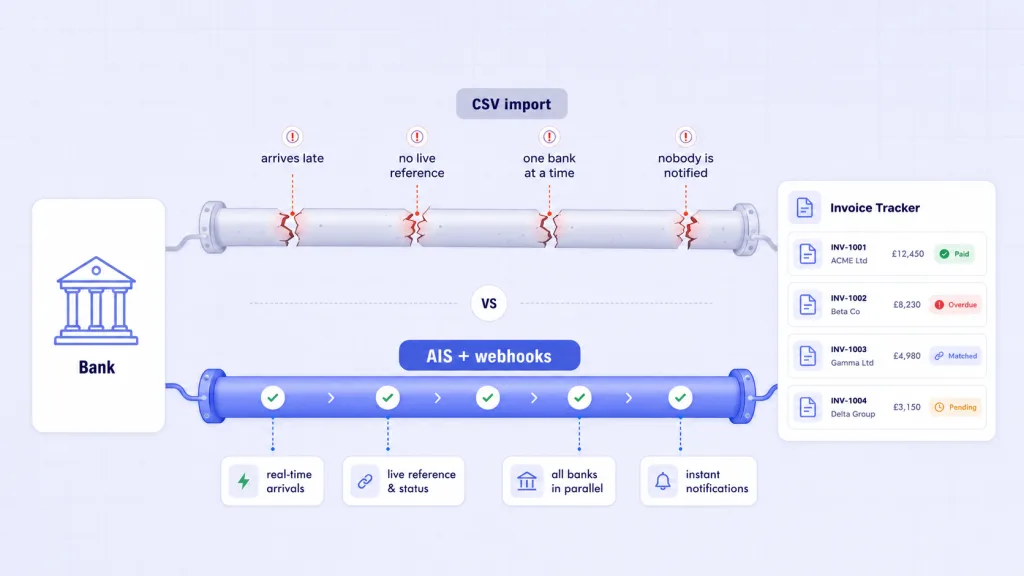
CSV imports reflect yesterday’s account. A payment lands Monday morning. The tracker shows the invoice as outstanding until the next import runs. A dunning email fires to a customer who already paid.
Partial payments need manual matching because the import carries no live reference data. Multi-bank businesses reconcile each account separately. And without a live signal, the status stays wrong until someone actively checks.
Late payments cost the UK economy an estimated £11 billion a year, with businesses owed around £26 billion at any given time (GOV.UK).
What finance teams actually need is near real-time status updates – not a faster version of the same delayed import. Each is a data problem, not a software problem. That is the gap automated payment reconciliation built on live bank data was designed to close.
“Most platforms already have the invoicing workflow. What they are missing is the bank data layer that closes it. When a payment arrives and the platform knows instantly, not on the next CSV refresh, the entire AR workflow changes.” – Ravi, Finexer
What Is the Finexer OB Invoice Tracker?
The Finexer OB Invoice Tracker is the invoice payment tracking and reconciliation layer that UK platforms build on – connecting invoice records to Open Banking payment initiation and live bank transaction data.
It is not an AR chasing tool or accounting ledger. It is the bank data and payment rail underneath the platform’s own invoice workflow.
The rails are proven at scale: Open Banking in the UK reached 17.94 million user connections and processed 37.46 million payments in March 2026, with 2.54 billion API calls (Open Banking Limited).
Finexer’s Invoice reconciliation tracker delivers real-time payment status from Pay by Bank initiation to bank-matched confirmation – for UK platforms that need invoice tracking and reconciliation in one webhook-driven layer.
It reads the bank account directly. When a payment lands, a webhook fires. The invoice updates because an event happened, not because a reconciliation job ran.
What the Finexer Invoice Reconciliation Tracker delivers:
• Invoice-linked Pay by Bank requests with unique payment reference generation
• Signed webhook events at every status: Payment Requested, Payer Opened Flow, Authorised, Submitted, Received, Matched
• AIS transaction matching against amount, reference and counterparty
• Exception handling out of the box: Partial Payment, Overpayment, Expired, Failed, Needs Review
• Audit log per invoice payment object and sandbox access
• FCA-authorised AISP and PISP on one API layer (FRN925695)
• Usage-based pricing and 3-5 weeks onboarding support
• 99% UK bank coverage
“Platform teams that build invoice tracking on real bank data stop chasing customers who paid yesterday. The webhook confirms payment before anyone on the team has checked. That is the operational change.” – Ravi, Finexer
How Does the Finexer Invoice Reconciliation Tracker Work?
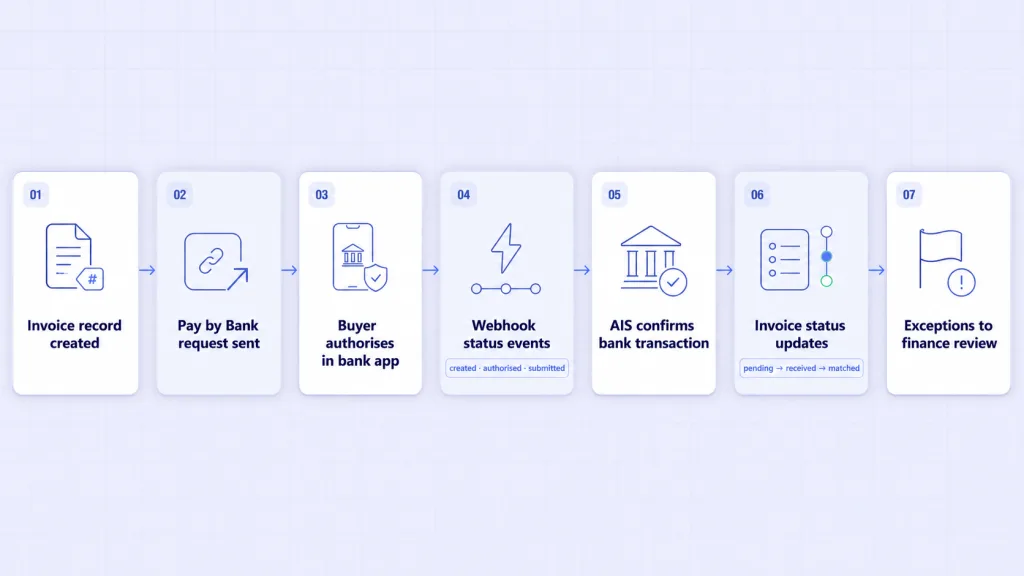
Seven steps, with a clear division of labour: the infrastructure supplies the data and payment rails, the platform owns the workflow.
- The platform creates an invoice-linked payment record: invoice ID, amount, payer details, due date and a unique payment reference
- A Pay by Bank request goes to the buyer through payment links for invoices tied to that reference and amount
- The buyer authorises the payment inside their own bank app, with Strong Customer Authentication where required
- Webhook events return each state change: created, authorised, submitted, rejected or expired
- AIS confirms the bank-side leg, checking incoming transactions against invoice amount, reference and counterparty
- The platform updates the invoice lifecycle in its own interface: pending, received, matched, partially paid or overpaid
- Exceptions route to finance users – mismatched amounts, missing references, duplicates and partial payments surface for review rather than disappearing
The live feed runs on real-time bank data via AIS. For settlement patterns over time, recurring transaction detection identifies clients drifting toward late payment before the invoice is overdue.
Who Builds Invoice Tracking on Finexer?
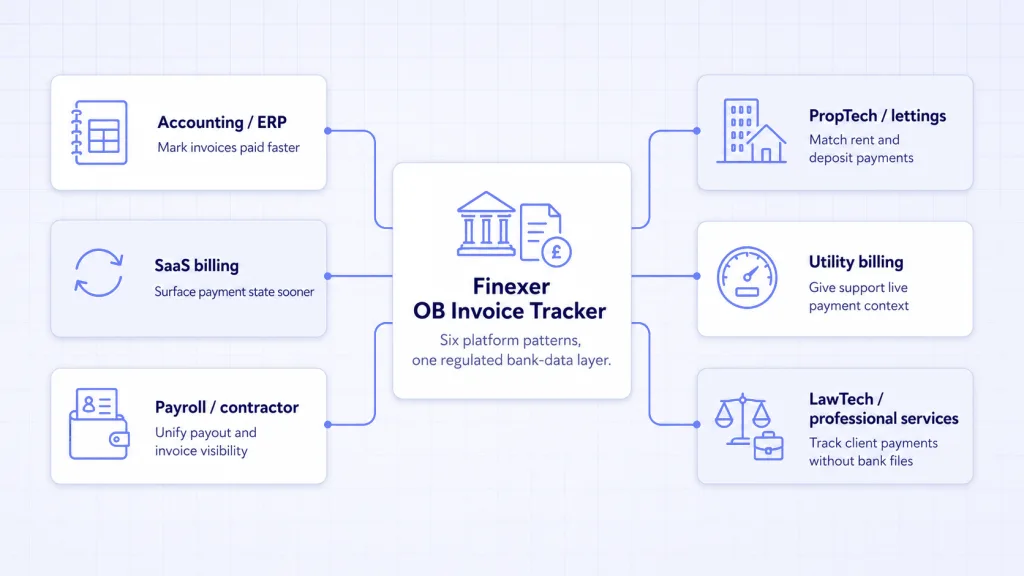
Six platform patterns use the same AIS and PIS foundation.
- Accounting and ERP platforms embed real-time invoice payment status, replacing the wait for CSV exports before marking invoices paid
- SaaS billing platforms surface payment state earlier, so dunning and activation actions fire on accurate data rather than delayed feeds
- Payroll and contractor platforms track payout and invoice records from one data layer, ending the disconnect between payment records and invoice records
- PropTech and lettings platforms tie payment requests to rent invoices with unique references, making manual bank transfer matching at volume a solved problem
- Utility billing platforms give customer support teams live payment context from bank data rather than batch imports
- LawTech and professional services platforms give matter-level invoice visibility without screenshots or bank files
The wider invoice workflow – issuing, collecting, reconciling – sits within invoicing automation built on the same Open Banking rails.
How Do You Choose the Right Invoice Tracker?
The right invoice tracker maps cleanly to volume and role. How to keep track of invoices differs depending on whether you are a freelancer with thirty invoices a month or a platform processing thousands.
- Under 50 invoices a month, single user: a spreadsheet is genuinely fine
- Moderate volume, one business: the embedded tracking in Xero, QuickBooks, Sage or FreeAgent
- High volume with an AR team: a dedicated tool such as Chaser, Satago or Upflow
- Building a platform where invoice tracking is a product feature: Open Banking infrastructure, with the tracker built on top
The first three are buying decisions. The fourth is a build decision.
How to Track Invoices and Payments Together?
The link between an invoice and its payment is always a bank transaction. The invoice lives in the finance system. The payment lands in the bank account. Closing that gap is the core of how to track invoices and payments accurately.
Manually, someone checks the bank statement, finds the matching credit and updates the invoice record. This works at low volume. At scale, partial payments, missing references and multi-bank accounts multiply the checking work significantly.
Open Banking AIS closes the gap by reading the bank account directly. When a payment arrives, the AIS feed delivers a structured transaction event – amount, reference, timestamp, counterparty – to the platform. The platform matches it to the open invoice using that structured data.
How to track invoices and payments becomes a data-driven match rather than a manual reconciliation task.
What exceptions does the Finexer Invoice Reconciliation Tracker handle?
Out of the box: Partial Payment, Overpayment, Expired, Failed, and Needs Review for low-confidence matches. Each exception routes to the platform’s finance workflow rather than requiring manual bank account checks.
Can an Open Banking invoice tracker handle manual bank transfers?
Yes, if the receiving account is connected through AIS and the transaction carries enough data to match. Manual transfers create more exceptions than Pay by Bank flows because the payer controls the reference – unmatched cases route to finance review.
What is the invoice management process?
The invoice management process moves an invoice from creation to settled ledger entry: created, sent, payment requested, payment received, matched to the bank transaction, and ledger updated. Most delays occur at the matching step, where bank data arrives on a periodic feed rather than in real time.
What happens when invoice status and payment status get out of sync?
Chasing emails go to customers who have already paid, cash-flow reports run stale, and support teams work without current context. The root cause is always a delayed or manual bank matching step – the invoice system does not know the bank account has received the payment.
Connect your invoice records to real-time Open Banking bank data and Pay by Bank initiation through Finexer’s FCA-authorised invoice reconciliation tracker.
Explore with AI
About the Author

Ravi Ranjan
Ravi Ranjan is Co founder & CEO of Finexer