OCR gets invoices into your system. Knowing exactly when they’ve been paid is a different problem. This comparison reviews the UK’s leading automated invoice processing software, which are Xero, QuickBooks, Sage, Basware and Coupa, and explains why reconciliation invoice workflows still depend on delayed bank feeds in many platforms.
It also shows how Open Banking AIS provides real-time payment confirmation, allowing finance teams and software platforms to reconcile invoices faster without waiting for scheduled bank feed updates.
Finexer builds FCA-authorised Open Banking infrastructure used by accounting and finance platforms across the UK. Working with invoice processing, payment initiation and real-time bank data gives us direct insight into where traditional reconciliation workflows create operational delays and how regulated AIS complements but does not replace existing accounting software.
Real-time invoice-to-payment matching. No CSV required.
With Finexer’s OB Invoice Tracker, stay connected and see invoice-matched payments instantly and not upon feed refresh.
“Finance teams I work with across accounting SaaS and payroll platforms tell me the same thing: the software is fine, but the bank data underneath it is a day old. The invoice is marked outstanding on Thursday. The payment landed on Tuesday. Every chase email sent in between is a relationship cost that the software never caused but never prevented either.”
By Ravi, Head of Platform Partnerships, Finexer
Has the Invoice Been Paid, or Is Your Software Still Waiting to Find Out?
Your accounts payable workflow completes successfully. The invoice is captured through OCR, routed for approval and included in the payment run. The supplier receives the money.
Yet your finance system still shows the invoice as outstanding.
The reason is rarely the invoice processing software itself. Most platforms reconcile payments only after receiving scheduled bank feed updates or imported statements. Until that data arrives, finance teams cannot confidently confirm settlement, triggering unnecessary payment chases, manual checks and delayed reporting.
That is the hidden gap this comparison examines. Alongside reviewing the UK’s leading automated invoice processing software, it explores how Open Banking AIS provides real-time payment confirmation, allowing platforms to match incoming bank transactions to invoices without waiting for the next bank feed refresh.
What Does Automated Invoice Processing Software Actually Do?
Automated invoice processing software handles the four steps between receiving an invoice and settling it: capture, matching, approval, and payment trigger.
Capture uses OCR to extract invoice data – supplier name, amount, date and line items – from PDFs, emails or scanned documents, removing manual data entry. PO matching checks the captured invoice against the relevant purchase order and flags discrepancies before approval. Approval routing sends the invoice to the right signatory based on amount, supplier, or cost centre rules. Payment trigger initiates the payment run when approval is confirmed, either via BACS file upload or increasingly via direct API to the bank.
None of the five platforms below natively confirm that the triggered payment has actually settled in the receiving account and matched back to the open invoice in real time.
For that step, platforms are building on invoice tracking software infrastructure, distinct from the processing layer.
Which Automated Invoice Processing Software Platforms Lead the UK Market?
No single automated invoice processing platform fits every UK business. Some products focus on accounting and reconciliation for SMEs, while others provide enterprise procurement, PO matching and complex approval workflows. The following comparison highlights where each platform performs best and the trade-offs to consider before selecting one.
Is Xero the Right Choice for UK SMEs?
Xero handles invoice creation, approval workflows and bank reconciliation for small- and mid-size UK businesses. Its bank feed connects to most UK high-street banks and pulls in transactions automatically. The reconciliation step, matching an incoming bank transaction to an open invoice, runs on Xero’s suggested matches algorithm, which works well at low volume.
At higher invoice volumes or where multiple bank accounts are involved, the suggested match queue becomes a daily manual task. Bank feeds refresh periodically but not in real time; therefore, a payment received at 9am may not appear for matching until afternoon.
Best for: UK SMEs processing under 200 invoices per month with a single bank account.
Does QuickBooks Handle AP Automation for UK Businesses?
QuickBooks offers invoice creation, recurring invoice schedules and a basic approval workflow within its higher-tier UK plans. Its bank feed operates on a periodic-refresh model similar to that of Xero. QuickBooks has stronger US feature parity than UK-specific AP depth although its UK bank coverage is broad for personal and SME accounts.
The accounts payable automation within QuickBooks is better suited to receivables management than it is to full procurement-to-pay workflows. For platforms embedding AP functionality, QuickBooks’ API supports invoice sync but not real-time bank transaction events.
Best for: UK SMEs already using QuickBooks for accounting, who need basic AR tracking alongside their existing workflow.
Does Sage Cover Mid-Market UK AP Requirements?
Sage 50 and Sage Intacct address mid-market UK businesses with more complex approval routing, multi-entity support and stronger audit trails than SME-tier tools. Sage’s UK presence and HMRC MTD compatibility make it a common anchor for growing finance teams. Bank reconciliation in Sage runs on imported bank statements or Sage’s own bank feed, periodic but not event-driven.
Sage does not natively initiate payments via Open Banking PIS. Payment runs export to BACS files or are handled via the business’s own banking portal. The invoice management process steps, involving approval, payment and confirmation, remain separated across systems.
Best for: UK mid-market businesses needing multi-entity AP, MTD compliance and audit-grade approval routing.
Is Basware Built for Enterprise AP Automation?
Basware is a procurement-to-pay platform for large enterprises, with deep PO matching, multi-currency support and supplier portal functionality. Its OCR capture is accurate at high invoice volumes, and its approval workflows handle complex cost-centre hierarchies. Basware integrates with ERP systems, including SAP and Oracle.
Bank reconciliation in Basware runs via ERP data sync and not direct bank connectivity. Settlement confirmation depends on the ERP’s payment run cycle rather than a live bank data layer.
Best for: Large enterprises with procurement teams, high PO-matched invoice volumes and existing SAP or Oracle ERP infrastructure.
Is Coupa Right for Procurement-Led Finance Teams?
Coupa combines spend management, procurement and AP automation in a single platform, making it the choice for organisations where procurement and finance operate from the same system. Invoice processing in Coupa includes OCR capture, three-way PO matching and configurable approval chains. Coupa Pay adds payment capability although UK bank connectivity depends on integration configuration.
As with Basware, Coupa’s bank reconciliation layer relies on downstream ERP or bank file imports rather than real-time bank transaction data. Settlement confirmation is not event-driven.
Best for: Large enterprises managing procurement spend and AP from one platform, particularly where supplier relationships are complex.
| Platform | Best For | OCR & AP Automation | Bank Reconciliation | Real-Time Bank Data | Key Limitation |
|---|---|---|---|---|---|
| Xero | UK SMEs | Invoice creation, approvals and basic AP workflows | Suggested matching via periodic bank feeds | ❌ No | Manual reconciliation increases with invoice volume. |
| QuickBooks | SMEs already using QuickBooks | Recurring invoices and basic AP automation | Periodic bank feeds | ❌ No | Better suited to AR than complex AP workflows. |
| Sage 50 / Sage Intacct | Mid-market businesses | Multi-entity approvals, audit trails and MTD compliance | Periodic bank feeds or imported statements | ❌ No | Payments and reconciliation remain separate processes. |
| Basware | Enterprise procurement teams | Enterprise OCR, PO matching and supplier portal | ERP-driven reconciliation | ❌ No | Depends on ERP payment cycles rather than live bank events. |
| Coupa | Procurement-led enterprises | OCR, three-way matching and spend management | ERP or bank file imports | ❌ No | No event-driven settlement confirmation. |
Why Does the Bank Feed Gap Break Invoice Reconciliation at Scale?
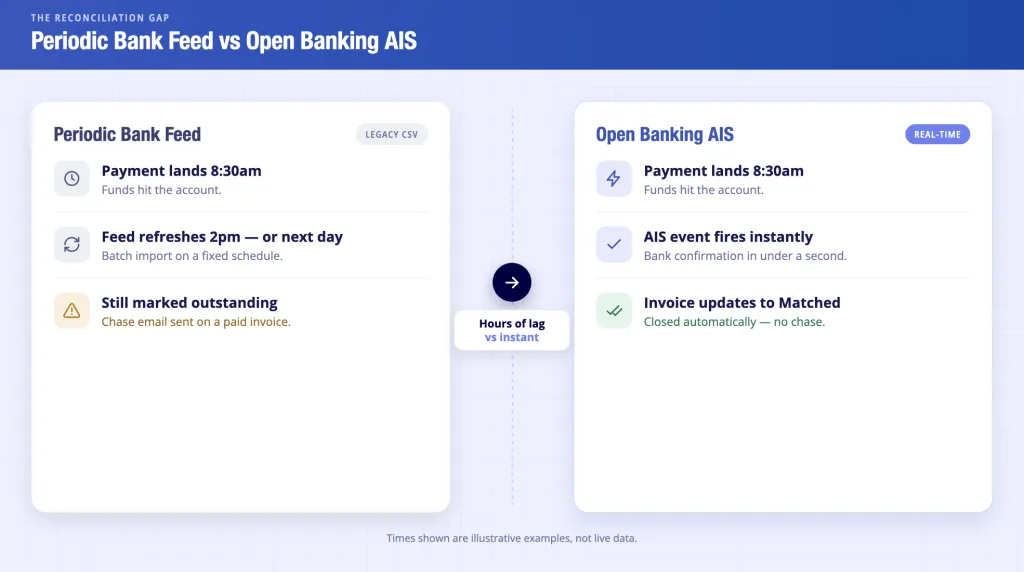
Every platform in the table above shares one structural limitation: none connects to the bank in real time via a regulated AIS data layer.
Periodic bank feeds refresh on a schedule: typically every few hours or once daily. A payment received by a supplier at 8.30am may not appear in the invoice platform until 2pm or the following morning. In that window, the invoice remains marked outstanding. Chase workflows trigger. Support tickets open. Finance teams cross-reference two systems manually.
The cost of this blindness is quantifiable at a national level. Late payments cost the UK economy almost £11 billion per year, with businesses owed an estimated £26 billion at any given time, according to GOV.UK’s late payment consultation data. The root cause is rarely the processing software. It is the bank data latency underneath it.
Automated payment reconciliation UK built on live AIS infrastructure closes this gap at the data level; it does that not by improving the software but by replacing the delayed feed with a real-time bank transaction event.
What Is Reconciliation Invoice Matching, and How Does Open Banking Change It?
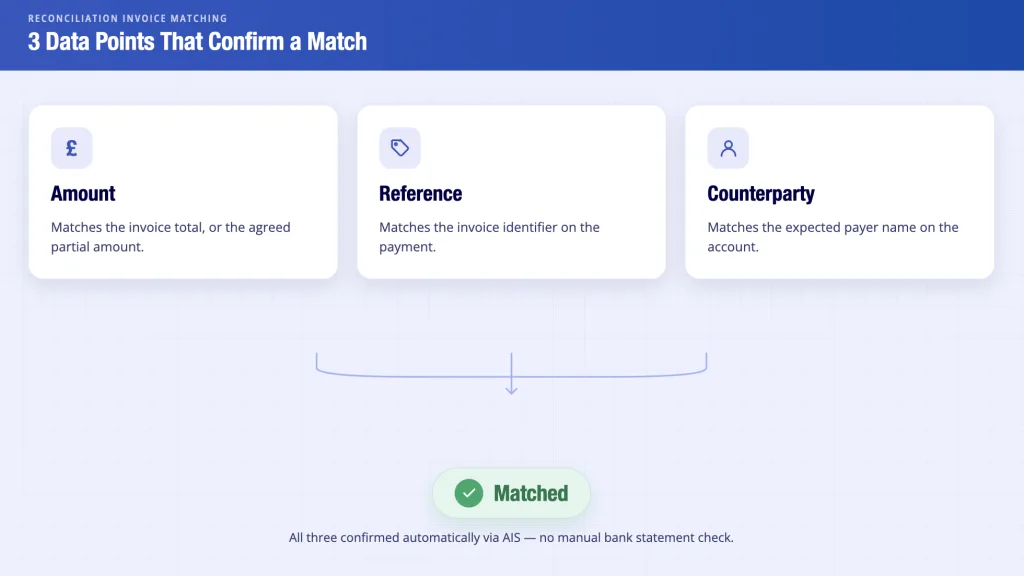
Reconciliation invoice matching is the step that links an incoming bank transaction to the open invoice it settles. It requires three data points to confirm: the amount paid matches the invoice total or an agreed partial amount, the payment reference matches the invoice identifier and the counterparty name matches the expected payer.
In traditional workflows, this step runs manually or on a scheduled batch. Someone checks the bank statement, locates the credit and updates the invoice record. At 20 invoices a month, that is manageable. At 500, it becomes the bottleneck.
Open Banking AIS changes the mechanism. When the receiving account is connected through an FCA-authorised AISP, an incoming bank transaction generates a structured data event, involving amount, reference, timestamp and counterparty, to the platform the moment it arrives. The platform matches it to the open invoice immediately without waiting for a file export or a manual check.
That is what Finexer AIS real-time bank data delivers at the infrastructure level. The accounting software above keeps its role, that of approval routing, PO matching and ledger entries. The AIS layer underneath it handles the real-time bank-to-invoice confirmation step that CSV feeds cannot.
How Does Finexer’s OB Invoice Tracker Work Underneath the Software?
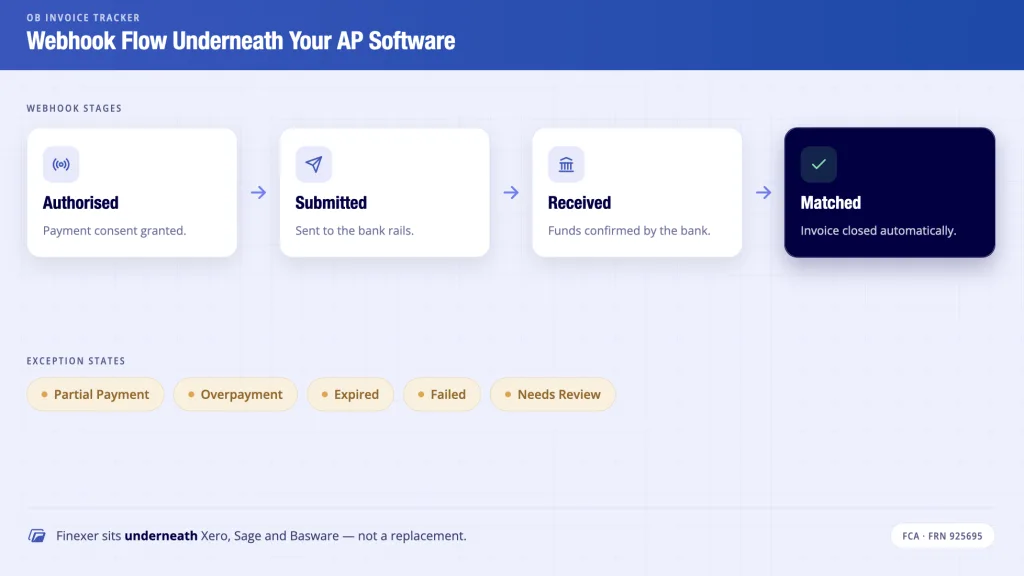
Finance teams processing B2B invoices at scale need payment confirmation before their accounting software can close the invoice, but CSV feeds do not deliver that in time.
Finexer’s Open Banking Invoice Tracker is the regulated data and payment layer that platforms embed underneath their invoice workflow. It is not a replacement for Xero, Sage or Basware. It is the bank connectivity layer that tells those platforms a payment has arrived, and exactly which invoice it matches, before the next CSV export runs.
The mechanism: Finexer PIS generates a Pay by Bank payment request tied to a unique invoice reference. When the buyer authorises the payment inside their own bank app, webhook events fire at each stage: Authorised, Submitted and Received.
Finexer AIS monitors the connected receiving account and fires a final webhook when a matching bank transaction arrives, confirming amount, reference and counterparty. The platform updates the invoice status to Matched without a manual check.
Relevant capabilities for invoice processing platforms:
- Invoice-linked Pay by Bank payment requests with unique reference generation
- Signed webhook events at each payment status stage: Authorised – Submitted – Received – Matched
- AIS real-time bank transaction monitoring against invoice amount, reference and counterparty
- Exception states delivered via webhook: Partial Payment, Overpayment, Expired, Failed and Needs Review
- Audit log per invoice payment object, exportable per record
- Usage-based pricing
- 3–5 weeks onboarding support from integration to production go-live
- 99% UK bank coverage – high street, challenger and business accounts – via one API
- FCA-authorised AISP and PISP, FRN925695
What is automated invoice processing software?
Automated invoice processing software captures invoices via OCR, matches them to purchase orders, routes them through approval workflows and triggers payment. It removes manual data entry and paper handling from the accounts payable process. The bank reconciliation step, which involves confirming that payment has landed, remains a gap in most platforms, addressed separately by real-time AIS bank connectivity.
What is the best automated invoice processing software for UK mid-market businesses?
Sage Intacct covers mid-market UK AP requirements with multi-entity support, MTD compliance and structured approval routing. For platforms where bank reconciliation latency is the core problem, pairing Sage with an Open Banking AIS layer, such as Finexer’s OB Invoice Tracker, closes the real-time matching gap that Sage’s periodic bank feed leaves open.
What is reconciliation invoice matching, and why does it fail at scale?
Reconciliation invoice matching links an incoming bank transaction to the open invoice it settles, using amount, reference and counterparty as matching criteria. It fails at scale because CSV bank feeds deliver transaction data hours or days after settlement, leaving invoices marked outstanding after payment has already arrived. AIS replaces the batch feed with a real-time transaction event.
Can Open Banking AIS work alongside Xero or QuickBooks?
Yes. Platforms use an FCA-authorised AIS layer to receive real-time bank transaction events and push matched invoice statuses into Xero or QuickBooks via those products’ own APIs. The accounting software remains the ledger and source of truth. The AIS layer provides the real-time bank confirmation step that their native bank feeds do not.
How does Finexer’s OB Invoice Tracker handle partial payments and exceptions?
When a bank transaction arrives that matches the invoice reference but not the full amount, Finexer’s AIS matching layer applies a Partial Payment exception webhook with the received amount, the shortfall and the timestamp. The same mechanism applies to Overpayment, Needs Review, Expired and Failed states, where each returns a reason code for finance team action.
See how Finexer’s OB Invoice Tracker delivers real-time invoice-to-payment matching inside your platform.
Explore with AI
About the Author

Ravi Ranjan
Ravi Ranjan is Co founder & CEO of Finexer