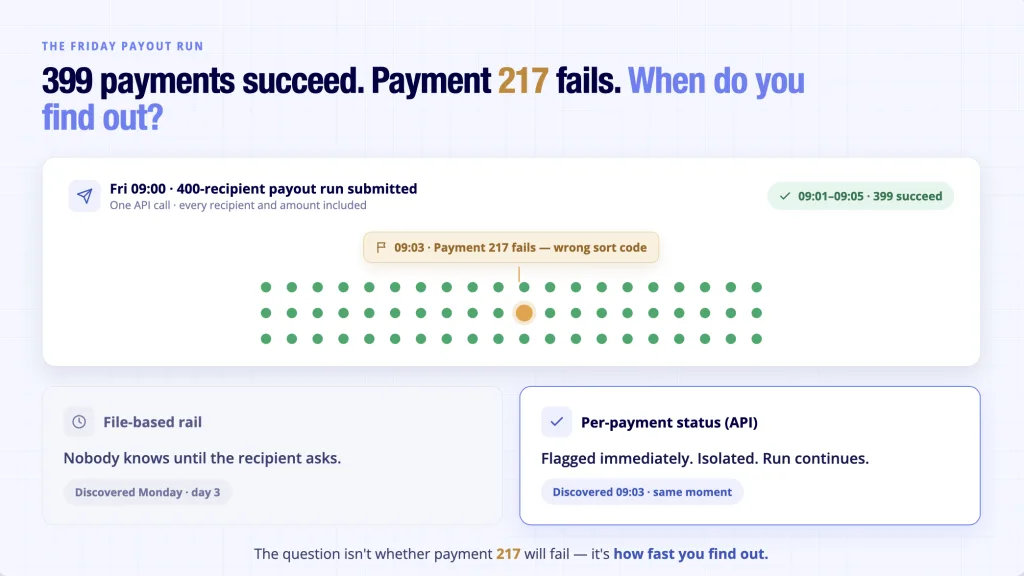
Your payroll product runs a 400-recipient payout on Friday. Payment 217 fails: wrong sort code. With a file-based rail, nobody knows until Monday (3rd day), when an employee messages your support team asking where their salary went.
That gap between “file submitted” and “money confirmed” is the real reason platform teams evaluate bulk payments providers. It is also why the provider pages you are comparing, all promising speed and scale in the same three adjectives, do not help much.
This checklist covers what separates them: rails, status visibility, coverage, regulation, pricing, and integration effort.
What Counts as Bulk Payments, and What Is a Batch?
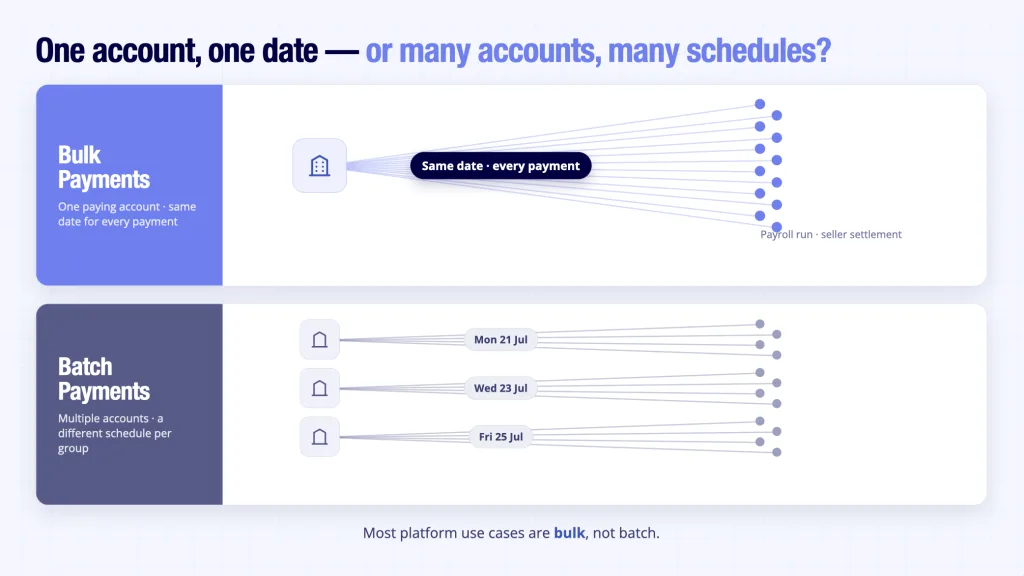
Bulk payments are a group of payments sent from one business account to many recipient accounts, all on the same date, in the same currency, and through the same payment scheme. A payroll run is the classic example: one account, one date, two hundred salaries.
Batch payments are broader. A batch can draw from multiple paying accounts, and the payments inside it can carry different execution dates or even run through different schemes.
Both definitions come from the Open Banking Standard’s Customer Experience Guidelines, and here’s the comparison for quick insights:
| Point of Distinction | Bulk Payments | Batch Payments |
|---|---|---|
| Paying account | One business account | Multiple accounts |
| Recipients | Many | Many |
| Execution date/scheme | Same for all payments | Can differ per payment |
| Typical use | Payroll run, seller settlement | Multi-entity or multi-schedule runs |
Most platform use cases are bulk rather than batch. Paying contractors, settling marketplace sellers, and running payroll all follow the same pattern: one account paying many recipients on the same day. For business bulk payments, the label matters mainly when reading provider documentation, because vendors use the two words loosely while regulators use them precisely.
BACS Batch vs Faster Payments API: The Rail Decision
Before comparing providers, decide the rail. It determines almost everything else. Business bulk payments in the UK run on one of two rails, and they behave very differently:
| Point of Distinction | BACS Direct Credit | Faster Payments (API-initiated) |
|---|---|---|
| Speed | 3-working-day cycle: submit, process, credit | Instant via Faster Payments, 24/7 |
| How it’s submitted | Formatted file for the bank | Single API call with all payment instructions |
| Per-payment status | Report after the cycle completes | Event per payment as status changes |
| Failure discovery | After the recipient expects the money | At initiation or within the run |
| Cost profile | Very low per item | Low per payment; no card or interchange fees |
| Scheme limit | Scheme-dependent | £1m per payment scheme maximum; providers set their own limits below that |
Bulk payments over BACS still make sense for some profiles: very high volumes, fixed monthly schedules, and teams that can live with the 3-day cycle. The Faster Payments route wins where your users expect confirmation rather than a wait, such as off-cycle payroll corrections, marketplace settlements, and refunds.
Choosing between the two is the first step in picking a bulk payment solution. The market context supports the API route: Open Banking Limited reported 2.54 billion API calls in March 2026 alone, with payment initiation the fastest-growing part of the mix.
The Bulk Payments Buying Checklist: 7 Criteria for Platform Teams
Shortlisting a bulk payment solution goes faster when every provider is scored against the same criteria. If you want to see how the main bulk payment systems in the UK compare on these, we have done that exercise separately. In one line each, the seven criteria:
- Rail and settlement: Know which rail carries your bulk payments and whether funds settle account-to-account.
- Per-payment status: Insist on a webhook per payment, not a report per file.
- Coverage: Confirm support for the accounts business bulk payments actually run between the payer side and the recipient side.
- Regulation: Verify FCA authorisation on the FCA Register, not the website badge.
- Pricing: Match the pricing model to your volume curve, including your worst quarter.
- Integration: Assess sandbox quality, documentation, and white-label options before committing to a bulk payment solution.
- Use-case fit: Score providers against your real payout profile, not a generic feature grid.
| Criterion | What to Check | Ask the Provider | Red Flag |
|---|---|---|---|
| Rail and settlement | Which rail runs the payout; account-to-account or pooled account | Do funds touch an intermediary account at any point? | Vague settlement descriptions |
| Per-payment status | How failures surface mid-run | What happens to payment 217 of 400 when it fails? | Status reported per file, after the cycle |
| Coverage | Payer-side and recipient-side accounts supported | Which UK business and challenger accounts do you support? | Coverage deep on consumer accounts, thin on business |
| Regulation | FCA authorisation, verified independently | What is your FCA reference number? | A badge on the site with no registration entry |
| Pricing | Fit between pricing model and payout volumes | How does our cost move in a slow quarter? | Committed volumes that punish seasonality |
| Integration | Sandbox, documentation, brand control | Can the payout flow run fully under our brand? | No sandbox, thin documentation |
| Use-case fit | Behaviour under your profile: payroll, settlement, refunds | Can we test our real payment run in the sandbox? | One demo scenario for every use case |
Different payout profiles stress bulk payments providers in different ways: payroll needs schedule reliability, marketplace settlement needs volume handling, and refunds need speed.
Test any shortlisted provider against the bulk payment services offered for your specific use case rather than the generic grid. And scope the geography honestly. This checklist covers UK-to-UK payouts, while international bulk disbursements bring a different set of problems and deserve a separate evaluation.
Where Does Finexer Fit?
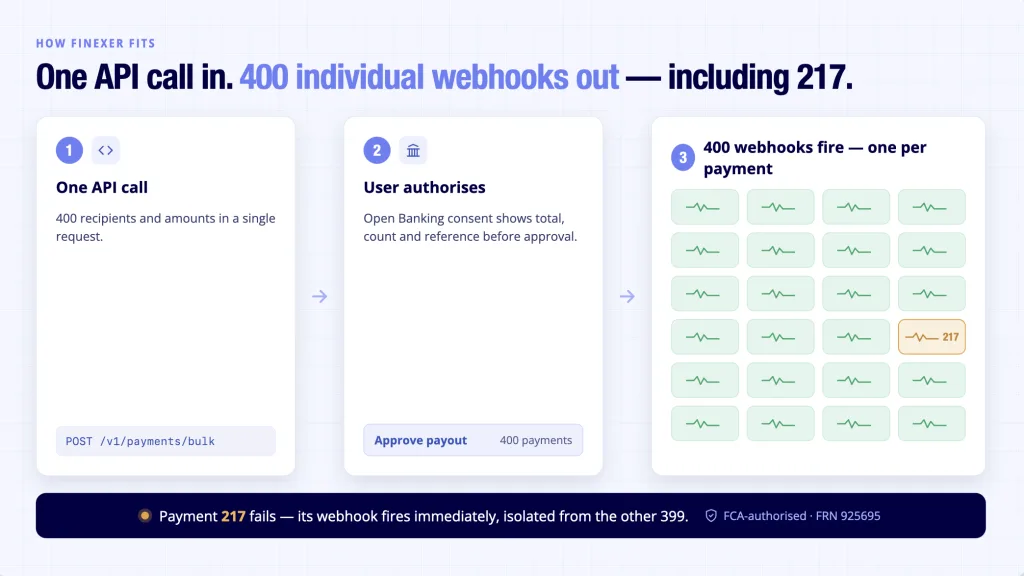
For platform teams comparing bulk payments providers for one-click multi-recipient payouts, the checklist above usually narrows to the Faster Payments API route. That is the problem Finexer’s Payments product is built for. Here is the mechanism, step by step:
- The platform submits a bulk payment run in a single API call, with every recipient and amount included.
- The paying user authorises the run with their own bank; the Open Banking consent flow shows the total, the number of payments, and the reference before approval.
- Each payment fires its own webhook as its status changes, so a failed payment surfaces immediately while the rest of the run continues.
- Payments settle account-to-account, instant via Faster Payments.
- The result is a bulk payment solution delivered as infrastructure: your product, your brand, Finexer underneath.
What does that give a platform team, specifically?
- One API call per run, one webhook per payment; no file uploads, no polling
- Partial-failure isolation: one failed payment does not hold the run
- FCA-authorised (FRN 925695) as both AISP and PISP
- Almost all UK banks covered
- Transparent pricing, white-label deployment, 3-5 weeks of onboarding support
Conclusion
The rail decision comes first, the provider decision second, and the seven criteria above turn provider pages full of identical adjectives into a scoreable comparison. That is how a business bulk payments evaluation should run: on evidence, not marketing. The strongest provider is not the one with the best landing page. It is the one that behaves best on a bad day: a run with one failed payment, a user asking questions, and an answer you can give in seconds instead of days.
What is the difference between bulk payments and batch payments?
Bulk payments go from one paying account to many recipients on the same date, through the same scheme. Batch payments can draw from multiple paying accounts with different execution dates or schemes. Most platform payout features, including payroll, settlements, and refunds, are technically bulk. The OBL Customer Experience Guidelines define both formally.
How do bulk payments work through an API?
The platform sends one API request containing all recipient details and amounts. The paying user authenticates directly with their bank and approves the run after reviewing the total and payment count. The provider initiates each payment, and status events report back per payment as funds move.
Do you need a business account for bulk payments?
In practice, yes. Business bulk payments are initiated from a business bank account, and banks apply their own payment limits and controls to business accounts. Check that your provider supports the business and challenger accounts your users actually hold, because coverage varies more on the business side than the consumer side.
What are the risks of bulk payments, and how do you reduce them?
The main risks are recipient-detail errors, duplicate runs, and failures discovered late. A well-designed bulk payment solution reduces all three: validation before initiation, a consent screen summarising the run before approval, Confirmation of Payee name-checking where supported, and per-payment status events so exceptions surface immediately rather than days later.
If you are scoping a payout feature and want to see the per-payment webhook flow against your own use case, Finexer’s team can walk you through the Payments API.
Explore with AI
About the Author

Yuri
Yuriy Yakushko is a fintech founder and software engineer with over 20 years of experience building financial technology. He’s passionate about creating scalable, secure infrastructure that helps businesses modernise how they access financial data and manage payments.