
Bank feed infrastructure for accounting and ERP platforms.
Validated financial data workflows for reconciliation-ready accounting systems.
How to fix data inconsistencies in Simply Accounting is one of those problems that feels like a software issue until you trace it back to where the data actually comes from.
The error message reads clearly: “Data inconsistencies have been detected in your database. Your data files may have been damaged.”
Most finance teams run the repair tool. The inconsistency clears. Three weeks later, the same error appears in a different client file.
The repair fixed the symptom. The workflow that created it is still running.
“Finance teams troubleshoot the accounting software when the problem is the data layer underneath it. Repair tools are backwards-looking – they fix what already went wrong. The question worth asking is why structured financial data is breaking in the first place.” – Ravi, Finexer
TL;DR
How to fix data inconsistencies in Simply Accounting permanently requires identifying where the error enters – not where it surfaces.In most cases the source is the manual import workflow: duplicate CSV periods, date format mismatches, and delayed syncing. Validation and verification of data at the bank feed layer – through a structured Open Banking AIS connection – removes these error classes before records reach the accounting system.
Key Takeaways
What actually causes data inconsistencies in Simply Accounting?
Disconnected bank feeds, duplicate CSV imports, delayed transaction syncing, and mismatched date formats. Most inconsistency errors trace back to the financial data pipeline – not file corruption.
What does validation and verification of data mean in accounting workflows?
Confirming that financial records are complete, non-duplicate, structurally consistent, and tied to a verified bank account before they enter the accounting system – not after.
Why do repair tools not fix Simply Accounting data inconsistencies permanently?
Repair tools address file corruption after it has occurred. They do not change the upstream import workflow that introduced the error. Without a structured, verified bank feed, the same errors recur with the next import cycle.
How does Open Banking AIS reduce accounting inconsistencies?
Bank transaction data flows directly from the account in a consistent, structured format. Formatting inconsistencies, duplicate imports, and delayed syncing are handled at the connection layer. The validation and verification of data happens before records reach reconciliation logic.
Why Do Data Inconsistencies in Simply Accounting Keep Recurring?
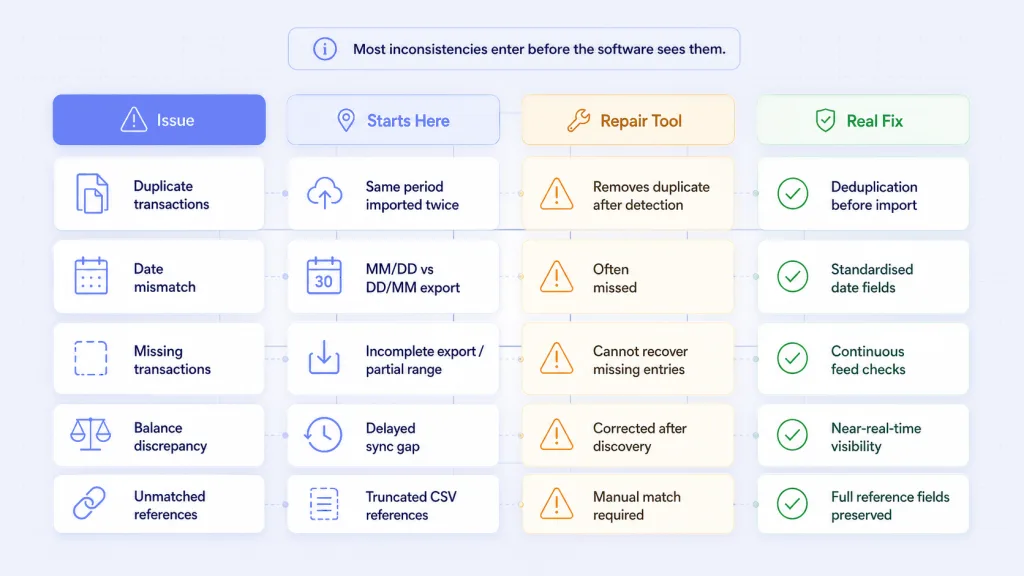
Most platforms receive financial data through one of three channels: manual CSV imports, scheduled batch feeds, or direct bank connections. The reliability gap between those three is significant – and most platforms are still on the first.
Manual CSV imports are the most common source of recurring inconsistencies. A date field formatted as DD/MM/YYYY in the accounting system receives a file exported as MM/DD/YYYY from the bank portal. The import appears to succeed. Transactions enter with incorrect dates. Reconciliation runs against wrong periods. The mismatch surfaces weeks later as a balance discrepancy that looks like file corruption.
The repair tool runs. The file is cleared. The same export process runs again the following month. The cycle repeats because the source of the problem was never in the file.
| Inconsistency type | Where it originates | What the repair tool does | What actually fixes it |
|---|---|---|---|
| Duplicate transactions | Same period imported twice from bank portal | Removes duplicate after detection | Deduplication at the feed layer before import |
| Date format mismatch | CSV exported in MM/DD vs DD/MM format | Often undetected – entries sit in wrong period | Structured bank feed with consistent date fields |
| Missing transactions | Incomplete export or partial date range | No recovery possible for entries never imported | Continuous bank connection with completeness checks |
| Balance discrepancy | Delayed syncing creates gaps between bank and books | Reconciliation correction after discovery | Near-real-time transaction visibility from source |
| Unmatched references | Payment references lost or truncated during CSV export | Manual matching against bank statement | Structured reference fields preserved at API layer |
Each row describes a recurring pattern – not a one-off corruption event. They repeat because the upstream process repeats. The error message is the end of the chain – not the beginning.
Platforms already dealing with reconciliation gaps will find the common breakpoints in manual reconciliation automation for UK accounting platforms.
What Does the Repair Tool Actually Fix?
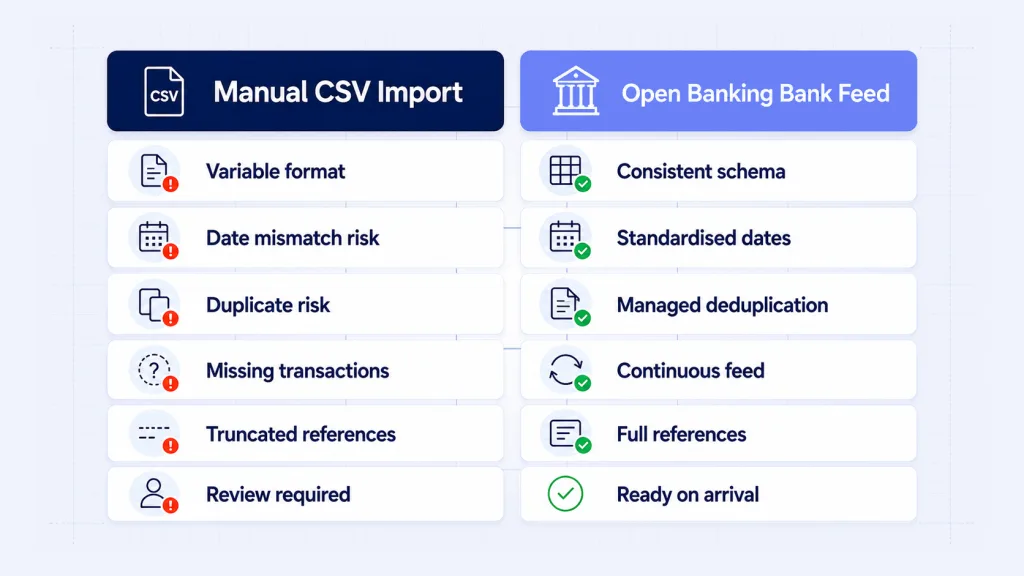
A common mistake is treating a workflow problem as a software problem. Repair tools exist for genuine database corruption – not for formatting errors introduced upstream by a manual export process.
Running a Simply Accounting repair tool on a database fed by poorly formatted CSV imports is like fixing a leaking pipe with a towel. The towel is useful. The leak continues.
To understand how to fix data inconsistencies in Simply Accounting at a structural level, the answer is validation and verification of data at the point of entry – before records hit the accounting system, not after the damage is visible.
The mistakes most platforms make:
- Running the repair tool without identifying which import step created the inconsistency
- Continuing the same CSV export workflow after clearing the error
- Treating reconciliation discrepancies as software bugs rather than data quality problems
- Not auditing which banks or export methods produce the most formatting variation
How Does Validation and Verification of Data Solve the Root Cause?
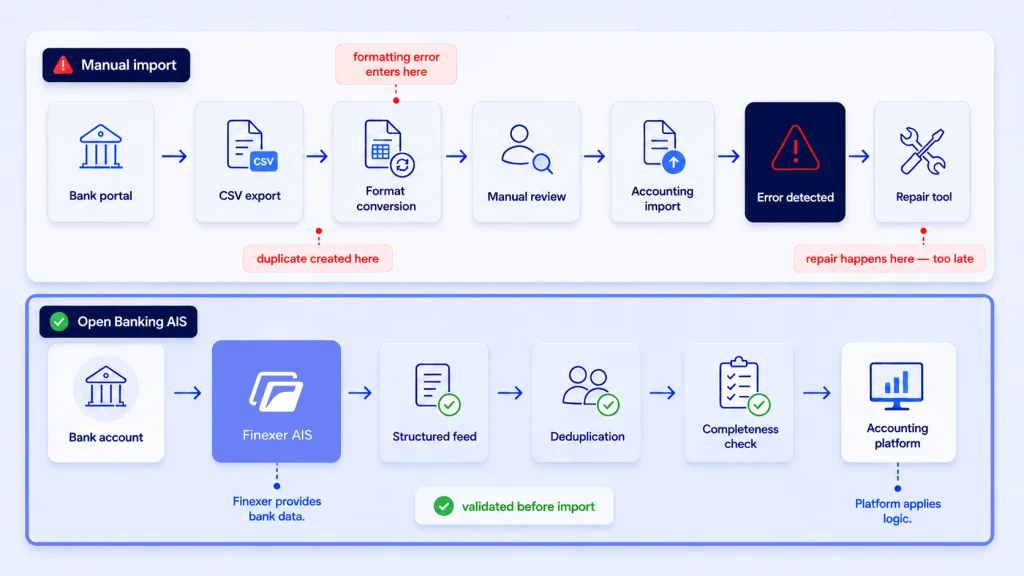
The fundamental difference between a CSV workflow and a connected bank feed is where formatting and completeness checks happen.
In a CSV workflow, formatting happens wherever the person downloading the file happens to be – a bank portal, an export tool, an accountant’s laptop. Each step introduces a chance for field misalignment, truncated references, or a wrong date format.
In an Open Banking AIS connection, the bank is the source. Transaction data arrives in a structured, consistent format – amount, date, counterparty, reference, direction – directly into the platform. The transformation steps between bank and books collapse to one standardised API call.
The operational detail – where the manual download-and-import cycle adds latency and how structured feeds change the reconciliation timeline – is examined in bank statement automation for UK accounting workflows.
| Workflow element | Manual CSV import | Open Banking AIS connection |
|---|---|---|
| Transaction source | Bank portal export – format varies by bank and export type | Bank account directly – one consistent API schema |
| Date field format | Varies – DD/MM, MM/DD, or YYYY-MM-DD depending on export settings | Consistent – standardised field across all supported connections |
| Duplicate risk | High – same period can be imported multiple times | Managed – deduplication at the feed layer |
| Missing transaction risk | High – incomplete date ranges, skipped exports | Low – continuous feed with completeness checks |
| Payment references | Often truncated or reformatted during CSV export | Preserved in full from the originating payment |
| Reconciliation readiness | Requires formatting review before each import cycle | Structured on arrival – reconciliation logic runs immediately |
Validation and verification of data – completeness, deduplication, format consistency – is not something accounting software performs on arrival. It is what the infrastructure layer must handle before records reach the platform. When it does, the error class that triggers the Simply Accounting alert largely disappears.
How Does Finexer Fix Simply Accounting Data Inconsistencies at the Source?
Finexer does not repair Simply Accounting files. It does not diagnose file corruption, fix existing inconsistencies in databases, or replace accounting software.
Finexer provides FCA-authorised Open Banking AIS – the bank account data infrastructure that accounting SaaS platforms, ERP systems, and finance automation tools use to replace manual CSV import workflows with structured, connected bank feeds.
The problem Finexer addresses is upstream: not what has gone wrong in the file, but what is feeding it incorrectly in the first place.
What Finexer’s AIS provides for accounting platforms:
- Bank transaction access across almost all major UK banks via a single integration
- Structured, consistent JSON format – one schema regardless of which bank
- Merchant identification and categorisation applied through the data layer
- Payment references preserved in full from the originating transaction
- Webhook delivery with retry logic – near-immediately on new transactions
- Up to 7 years of account history for retrospective reconciliation and audit
- Balance access across connected accounts via the same integration
- Timestamped consent logs for audit trail requirements
What Finexer does not replace:
- The platform’s own reconciliation matching logic
- Chart of accounts management
- Accounting software functionality
- Tax calculation or VAT filing
The bank feed arrives structured and verified. The platform applies its own reconciliation and categorisation logic on top.
37.46 million Open Banking payments were processed in March 2026 ( Open Banking Limited ). Coverage now spans almost all major UK banks. Platforms still running manual CSV cycles have a clear operational case for switching.
- FCA-authorised (FRN 925695)
- 3 to 5 weeks of hands-on onboarding support
- Usage-based pricing, commercial terms agreed based on use case
“The platforms that stop seeing data inconsistency errors are the ones that stopped importing data manually. The repair tool conversation disappears when the upstream workflow changes.” – Ravi, Finexer
Which Platform Types Have the Most to Gain From This Fix?
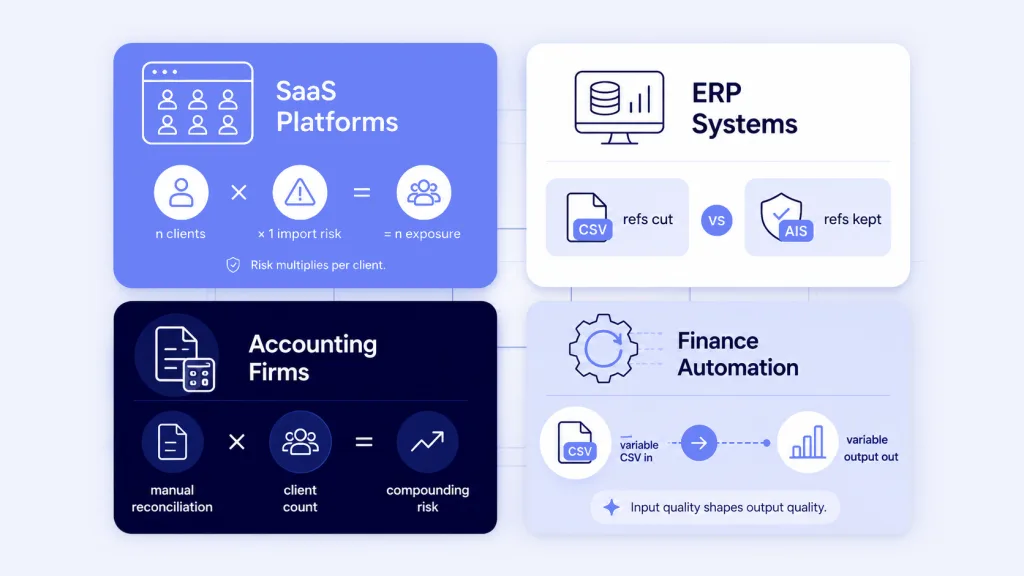
Best for: SaaS platforms managing multiple clients. When a platform built on Simply Accounting-style import workflows processes data for dozens of clients, CSV import cycles scale poorly. A connected bank feed delivers structured output per client without a manual step. The validation and verification of data check happens at the connection layer, not during a post-import review.
Best for: ERP systems with connected financial workflows. ERP platforms linking payment records to operational data need consistent transaction references to match purchases to invoices. CSV exports frequently truncate references. A bank feed preserves references in the format the originating payment carried – making ERP matching logic more reliable at scale.
Best for: Accounting firms running multi-client reconciliation. ACCA guidance recommends monthly reconciliation at minimum for financial accuracy. For firms reconciling across multiple client accounts, the manual import workflow multiplies formatting risk by client count. Connected bank feeds reduce that to a configuration question rather than a monthly formatting exercise.
Best for: Finance automation platforms. Tools building automated categorisation, spend analysis, or cash flow forecasting need structurally consistent input every cycle. Bank feeds deliver a consistent format that does not depend on who ran the export or which portal was used.
Not the right fit for: Platforms where clients exclusively use banks outside almost all major UK bank coverage, or workflows that require manual document review as a compliance step before entry.How to fix data inconsistencies in Simply Accounting for good?
Run the repair utility and reconcile the affected period. Then identify which import step created the error – duplicate period, date mismatch, or incomplete range – and replace that step with a connected bank feed. The feed handles formatting and completeness before records enter the system.
What causes accounting mismatches in Simply Accounting and similar platforms?
Almost always an import workflow problem, not a software bug. The most common causes are duplicate transaction imports for the same period, date format mismatches between bank export settings and accounting system expectations, incomplete CSV date ranges, and payment references truncated during export. These recur with every import cycle until the workflow changes.
What is validation and verification of data in accounting?
Confirming that records are complete, non-duplicate, and tied to a verified account before they enter the accounting system. In a connected bank feed, this happens at the infrastructure layer. In a manual CSV workflow, it either does not happen or requires a manual review step that introduces its own errors.
How do connected bank feeds improve accounting accuracy day to day?
Bank transaction data arrives directly from the account in a consistent format – standardised date fields, full payment references, deduplication handled at the feed layer. The manual steps where formatting errors enter are removed. Reconciliation logic runs against structured input from day one of the connection, rather than requiring a formatting review before every import.
Stop fixing data inconsistencies in Simply Accounting after they appear.
About the Author

Ravi Ranjan
Ravi Ranjan is Co founder & CEO of Finexer