Stop matching invoices by hand.
See how Finexer Invoice reconciliation tracker fires a bank-confirmed match the moment a payment settles.
Finance teams rarely struggle because they lack reconciliation software. More often, they struggle because the information needed to reconcile a payment never reaches that software in a reliable, structured form. At Finexer, we work with UK accounting platforms, ERP providers and finance technology businesses embedding Open Banking into invoice payment and reconciliation workflows.
Across these implementations, the recurring challenge isn’t applying matching rules; it’s preserving the payment reference and receiving bank-confirmed settlement data quickly enough for automation to work as intended.
This guide explains the five-step invoice reconciliation process flow, where automation typically breaks down and how Open Banking helps connect the payment journey from invoice creation through to matched settlement.
TL;DR: Most automated invoice reconciliation projects don’t fail because the matching engine is weak; they fail because the invoice reconciliation process flow breaks before bank-confirmed payment data reaches it. Anyone who has worked with UK platforms building reconciliation workflows would realise that reliable automation depends on connecting every stage of the invoice reconciliation process flow, from structured invoice capture through payment confirmation and exception handling, rather than optimising any single step in isolation.
By Ravi, Platform Workflows at Finexer
“At Finexer, I work with UK platforms across accounting, payroll, and lawtech, and the same pattern shows up every time a finance team tells me their reconciliation backlog won’t shrink. They’ve built strong matching rules. What they haven’t built is a way for the bank confirmation to arrive per payment, in real time, carrying the reference the matching engine actually needs.”
The Problem With Automated Invoice Reconciliation in 2026
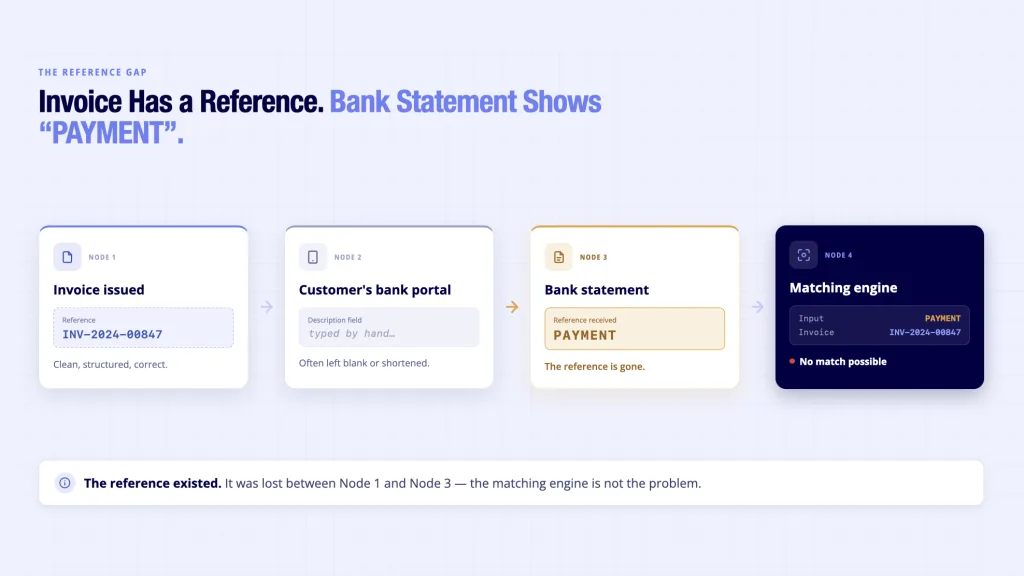
A bookkeeper at a 40-client practice opens the banking portal every morning to fifteen unattributed credits. Some carry a customer’s surname. Some say “PAYMENT” or nothing at all. Each one gets manually checked against open invoices before the ledger can close for the day.
This costs the practice roughly an hour per day, every day, across every client account it manages: time that scales with client count rather than shrinking with better software. It persists because most accounting platforms sold “automated invoice reconciliation” as a matching feature, when the actual failure sits upstream, in whether the payment ever carried a usable reference in the first place.
If you’re reconciling on the AR side instead, matching one bulk incoming payment against several open invoices, the process for reconciling bulk incoming payments covers that half of the problem directly.
The 5-Step Invoice Reconciliation Process Flow
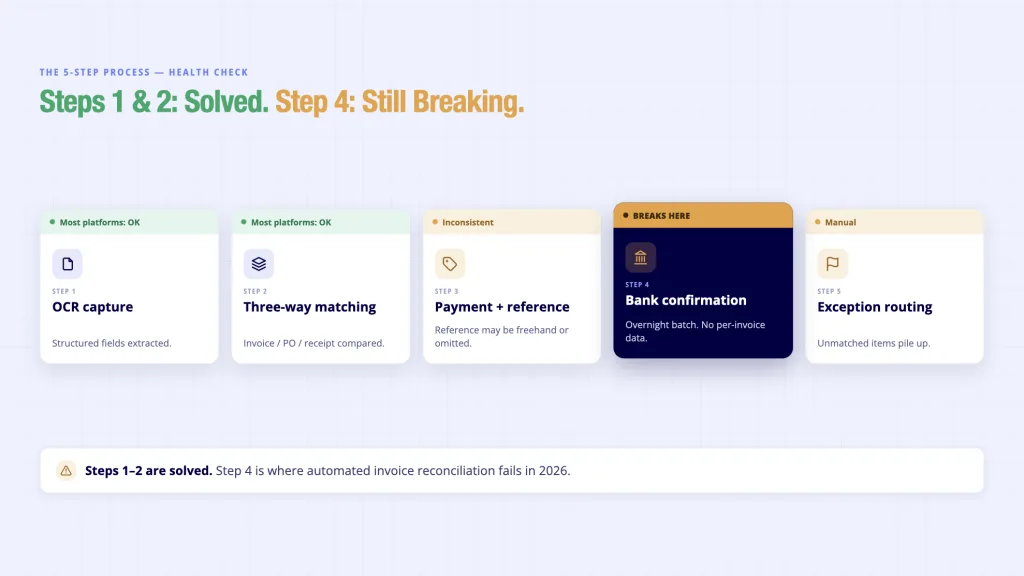
Automated invoice reconciliation is not one action. It is five steps, and automation only holds if every step feeds clean data into the next one.
- Data capture (OCR extraction). The invoice arrives as a PDF or scanned image. OCR extracts the invoice number, amount, due date, and supplier or customer details into structured fields the accounting platform can act on. If this step misreads a digit, everything downstream inherits the error.
- Three-way matching (invoice / PO / receipt). For purchase-side reconciliation, the platform checks the invoice against the original purchase order and the goods-receipt record. All three must agree on quantity and price before the invoice moves to payment. This is the step most AP teams already run manually, and it’s the single biggest driver of approval delay when any of the three documents disagree.
- Payment initiation with an embedded reference. The payment leaves the business account carrying the invoice number as a structured reference, not typed freehand into a bank transfer field where it can be left blank or shortened.
- Real-time bank confirmation. The receiving bank confirms settlement per payment, with the same reference intact, delivered as it happens rather than in an overnight batch file.
- Exception routing. Anything that doesn’t match cleanly, a partial payment, a lump sum covering several invoices, or a missing reference, gets flagged with a reason code and routed to the right person, instead of sitting in an unlabelled suspense account until month-end.
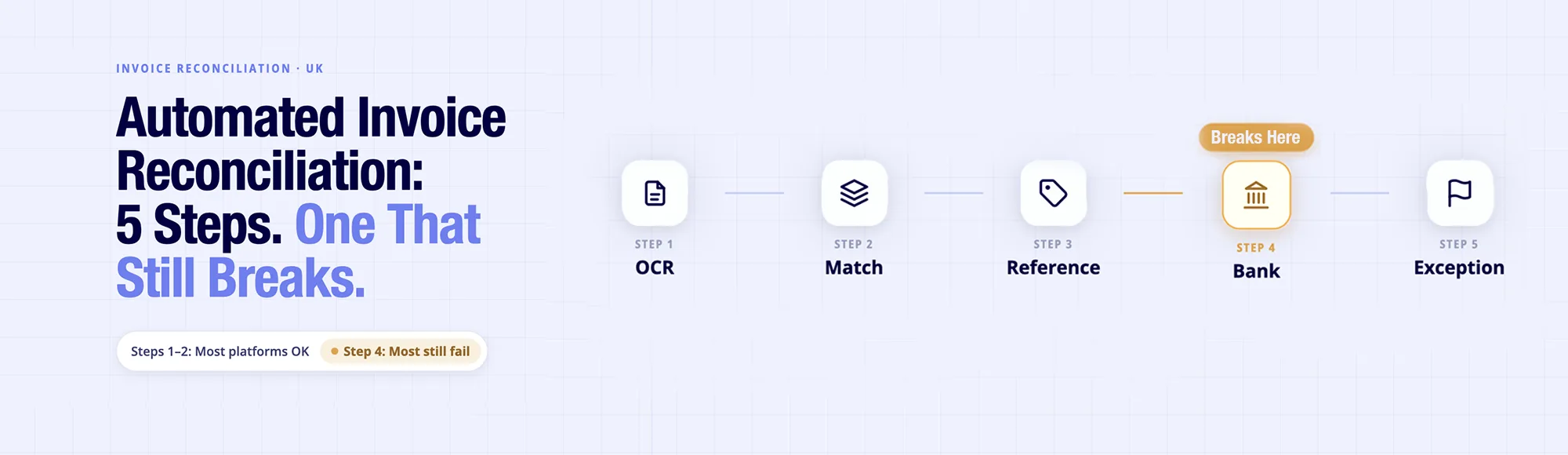
Most platforms automate steps one and two well. Step three is inconsistent. Step four is where the invoice reconciliation process flow actually breaks, because most bank data still arrives as an end-of-day batch with no per-invoice breakdown.
What a Solution Needs?
Before evaluating any tool, UK finance teams should confirm it supports the entire invoice reconciliation process flow, not just invoice matching:
- Captures structured data at the source: not just OCR text, but fields the matching engine can query.
- Runs three-way matching automatically: invoice, PO, and receipt compared without a human opening three tabs.
- Embeds the reference at payment initiation: so the identifier survives the transfer, not just the invoice.
- Delivers bank confirmation per payment, in real time: a webhook at settlement, not a file at midnight.
- Routes exceptions with a reason code: “Needs Review, missing reference” beats an unexplained unmatched line.
- Produces an audit trail: every match, and every exception, traceable for MTD for Income Tax’s quarterly digital submission requirement.
Where the Existing Tools Stand?
| Capability | Traditional AP Automation | Bank-Feed CSV Import | Open Banking–Connected Reconciliation |
|---|---|---|---|
| Reference embedded at payment | No | No | Yes |
| Bank confirmation timing | Manual upload | End-of-day batch | Real-time, per payment |
| Exception reason codes | Partial | No | Yes |
| Payment audit trail for MTD | Manual compilation | Manual compilation | Automatically generated per payment |
The Gap: Why Matching Software Alone Doesn’t Close the Loop
Every option in that table can extract data and apply matching rules. None of them control what happens between the customer’s bank and the finance platform’s bank feed, and that’s exactly where the reference either survives or gets lost.
A client pays £18,500 at 9.43am covering three invoices, with no reference attached. The matching engine, however well built, has nothing to match it against until a human decomposes the payment by hand. Closing that gap requires the reference to travel with the payment itself, from initiation through to bank-confirmed settlement.
When that happens, the entire invoice reconciliation process flow stays intact, allowing matching to complete automatically instead of relying on manual investigation. It also explains why data connectivity matters at the infrastructure layer rather than only at the software layer.
Finexer’s OB Invoice Tracker: Closing the Reconciliation Gap
The finance teams described above have matching software. What they’re missing is a bank confirmation that arrives per invoice, in real time, carrying the same reference the payment left with.
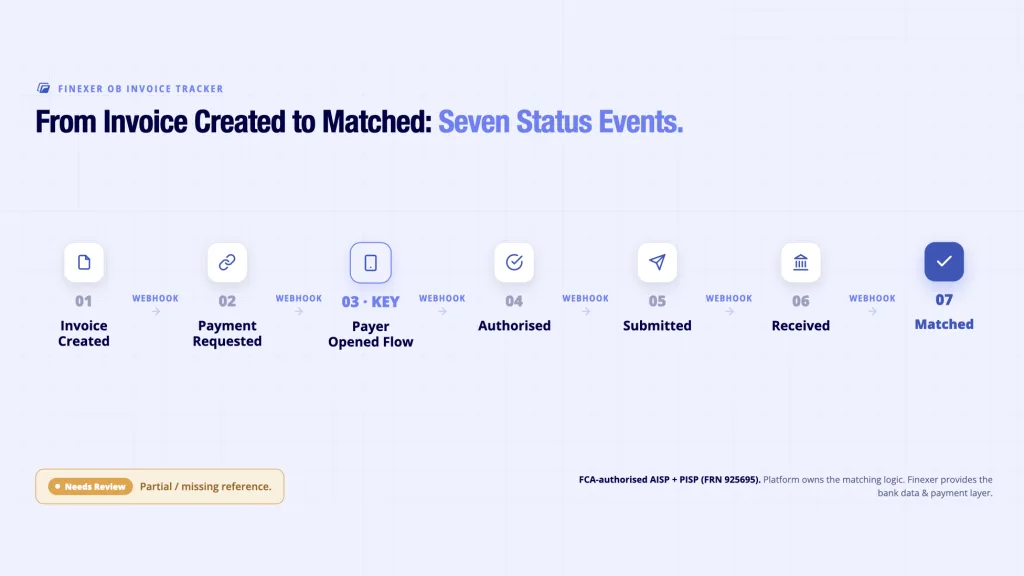
Finexer Invoice reconciliation tracker product combines PIS and AIS to close that gap: PIS initiates the payment with the invoice reference embedded at the point of payment, and AIS monitors the receiving account, firing a webhook the moment the bank confirms settlement, with the reference intact.
The status model moves the invoice through Invoice Created → Payment Requested → Payer Opened Flow → Authorised → Submitted → Received → Matched, and anything that doesn’t match cleanly lands in a Needs Review state with a reason code, rather than an unexplained unmatched line. See how Pay by Invoice actually works for the payment-initiation mechanism behind step three.
- Real-time webhooks at each status change, not overnight batch files
- Per-payment reference carried from initiation through to bank confirmation
- Needs Review exception state with a reason code for missing or partial matches
- Almost all UK banks covered
- FCA-authorised AISP and PISP (FRN 925695)
- Transparent pricing
What Is the Invoice Reconciliation Process Flow?
The invoice reconciliation process flow is the sequence a payment follows from invoice issue to ledger update: data capture, matching, payment initiation, bank confirmation, and exception handling. Most breakdowns happen at the bank confirmation step, when settlement data arrives as a batch with no per-invoice reference attached.
When the reference travels with the payment through Faster Payments and reappears in the AIS transaction data, the final matching step runs automatically instead of waiting for a person to decompose it.
How does automated invoice reconciliation work?
It runs through five steps: data capture, three-way matching against the PO and receipt, payment initiation with the reference embedded, real-time bank confirmation, and exception routing for anything unmatched. Each step depends on the one before it passes clean, structured data forward.
What are the benefits of automated invoice reconciliation?
Same-day ledger updates instead of a day-old cash position, fewer unmatched exceptions at period-end close, and an audit trail that supports MTD for Income Tax’s quarterly digital submission requirement. The main benefit is time: reconciliation stops scaling with invoice volume.
Which software handles automated invoice reconciliation?
Traditional AP automation tools handle OCR and three-way matching well but rely on manually uploaded or batched bank data. Open Banking–connected tools, including Finexer Invoice reconciliation tracker , add real-time, per-payment bank confirmation on top of that matching layer.
Can Open Banking replace three-way matching software?
No. Open Banking AIS and PIS provide the payment reference and bank-confirmed settlement data; the accounting or AP platform still performs the three-way match between invoice, PO, and receipt.
Is bank-confirmed reconciliation data covered under FCA regulation?
Yes. Providers offering Account Information and Payment Initiation Services in the UK must be FCA-authorised. Finexer is authorised as both an AISP and PISP under FRN925695.
See how Finexer Invoice reconciliation tracker matches payments to invoices the moment they settle.
Explore with AI
About the Author

Ravi Ranjan
Ravi Ranjan is Co founder & CEO of Finexer