Connected invoice workflows. Per-payment references. Reconciliation-ready data.
Open Banking PIS and AIS for platforms where invoice reconciliation still runs manually.
At any given time, UK businesses are owed roughly £26 billion in late payments, and the delays cost the economy around £11 billion a year. Behind both numbers sits the same quiet discipline: invoice reconciliation. It’s usually discussed as a single process.
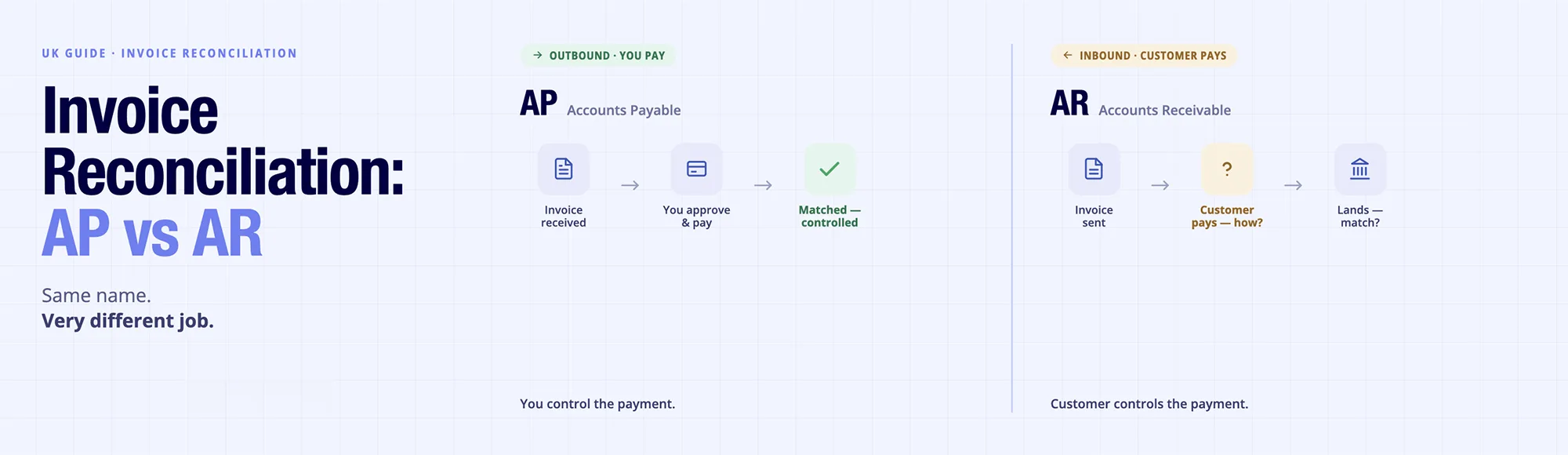
Still, in practice, it’s two very different jobs: verifying supplier invoices before money leaves (accounts payable) and matching incoming payments to the invoices you’ve issued (accounts receivable). The two share a name; the skills, tools, and failure points don’t.
This guide breaks down both sides- what AP and AR reconciliation each involves, where they differ, a step-by-step process that works for either direction, and what to do when a payment won’t match. If your team still closes the gap between “invoice sent” and “payment matched” by hand, the next few minutes will show you where the hours are going, and which of them you can get back.
What Is Invoice Reconciliation?
Invoice reconciliation is the process of confirming that invoices issued (or received) match corresponding payments and bank transactions. Think of it as a three-way conversation between your invoice records, payment records, and bank data.
In practice, invoice reconciliation comes in several forms. Here’s how the main variants differ:
| Reconciliation Type | What It Matches | When Used | Scope |
|---|---|---|---|
| Invoice reconciliation | Invoices to payments and transactions | Daily or weekly in AP and AR teams | Accounts payable and receivable |
| 3-way matching | PO, invoice, receipt (AP only) | Pre-payment verification | Procurement-driven (prevents duplicate payments) |
| Bank reconciliation | Bank statement to ledger | Monthly or end-of-period | Entire bank account (not invoice-specific) |
| Account reconciliation | General ledger accounts to detail | Monthly or quarterly | Balance sheet reconciliation |
Reconciling invoices happens continuously as payments flow in and out. It’s distinct from bank reconciliation (a period-end task) and 3-way matching (which stops payments before they leave).
Understanding AP Reconciliation
Accounts Payable (AP) reconciliation matches invoices you’ve received from suppliers to the payments you’ve made (or are scheduled to make) to those suppliers.
AP invoice reconciliation follows a straightforward sequence: capture the invoice, validate its contents (amount, date, vendor), match it to a purchase order or prior commitment, resolve any discrepancies, and approve for payment or record as paid. For most organisations, this is a 2-way match (invoice to PO) rather than a 3-way match (invoice to PO to goods receipt), though the latter does reduce exceptions further.
When reconciling invoices on the AP side, the goal is to prevent duplicate payments, catch vendor overbilling, and maintain an accurate supplier ledger. When invoices can’t be matched, perhaps because the amount differs by a few pounds or the reference is incomplete, they become exceptions that require manual review.
Understanding AR Reconciliation (Why Incoming Payments Are Harder to Match?)
Accounts Receivable (AR) reconciliation is the inverse: matching payments you receive from customers to the invoices you issued to them.
Why is reconciling invoices harder on this side?
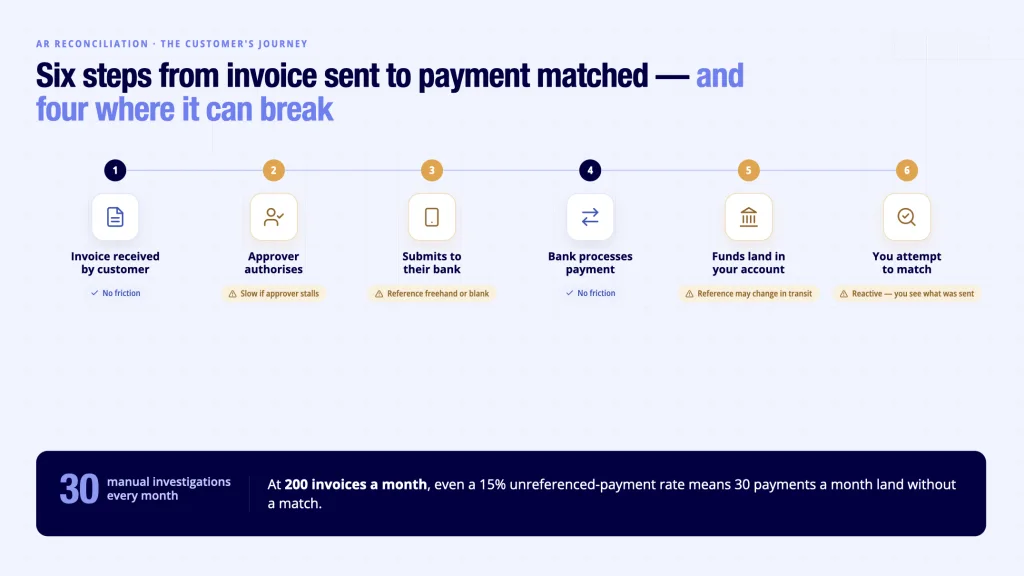
Because the process is reactive and fragmented. Your customer sends a payment, but you may not know immediately which invoice it’s for. They might batch several payments into one bank deposit. They might reference their PO rather than your invoice number.
They might send a partial payment, a full payment for multiple invoices, or an overpayment. And if they don’t include a clear reference at all, or the payment arrives with a description your system doesn’t recognise, you can’t auto-match it.
The customer’s payment journey goes: invoice requested → authorised by their approver → submitted to their bank → bank processes it → it lands in your bank account → you match it against your invoice. Each step introduces potential friction. When a payment arrives without a matching invoice or with an unrecognisable reference, it enters an exception state and requires investigation.
This is where invoice reconciliation on the AR side becomes time-intensive. At 200 invoices a month, even a 15% unreferenced-payment rate would, hypothetically, mean 30 manual investigations every month.
AP vs AR Invoice Reconciliation: Key Differences
| Aspect | AP Invoice Reconciliation | AR Invoice Reconciliation |
|---|---|---|
| Direction | Outbound – invoice received, payment sent | Inbound – invoice sent, payment received |
| Control | You control the payment (approve or reject) | Customer controls the payment (timing, reference) |
| Matching difficulty | Moderate – PO and GRN data is in-house | High – customer payment reference varies |
| Timing | Pre-payment (prevents errors) | Post-payment (reactive matching) |
| Exception rate | Lower – controlled process | Higher – depends on customer discipline |
| Tools needed | PO matching, duplicate prevention | Payment reference parsing, account linking |
How to Reconcile Invoices Step by Step?
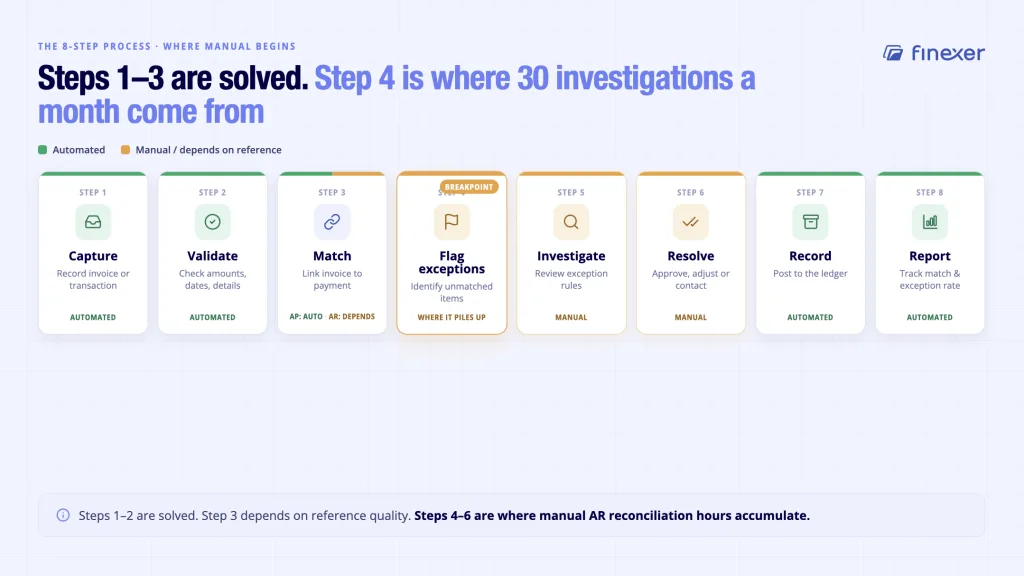
Reconciling invoices follows a standard process, though AR typically requires more manual intervention than AP. Here’s the framework:
- Capture: Record the invoice (AP) or bank transaction (AR) in your system or ledger
- Validate: Check that amounts, dates, and customer/vendor details are accurate
- Match: Link the invoice to the corresponding payment, or vice versa
- Flag exceptions: Identify unmatched or partially matched items
- Investigate: Review exception rules (amount variance, date window, reference mismatch)
- Resolve: Approve matches, adjust amounts, or contact the customer/vendor
- Record: Post matched invoices to the ledger and archive records
- Report: Track metrics (match rate, exception rate, days to reconcile)
Where Reconciling Invoices Breaks Down?
Common problems emerge at step 4. Unmatched payments pile up when references are vague or missing. Invoice amounts don’t match payment amounts due to discounts, tax differences, or partial payments. Payment dates fall outside the expected window, making it unclear which month’s cash flow they belong to. These exceptions require human investigation, and at scale, especially when reconciling invoices in AR, they become a bottleneck.
Why Fixing Exceptions Pays Off?
The impact is measurable. In one audit-evidence example, reconciliation timelines fell from 20–30 days to around 2 days once payment and transaction matching moved onto bank data; see real reconciliation case studies for how that worked in practice. This is achievable because the matching rules themselves (amount, reference, date) are deterministic once payment references are standardised.
From April 2026, many UK finance teams face an additional deadline: Making Tax Digital for Income Tax applies to sole traders and landlords with qualifying income over £50,000, requiring digital records and quarterly updates. That raises the value of keeping records current rather than reconciling in arrears.
For immediate wins, the path is clear: standardise payment references with your customers, implement automated matching rules for common scenarios, or look at automating this end-to-end , and flag exceptions with enough metadata to resolve them quickly. That’s where the real time-saving lies.
Where Does Finexer Fit?
For platforms whose users are still reconciling invoices from statement exports, the hardest part is the AR side: knowing, without manual checking, when an issued invoice has been paid and matched.
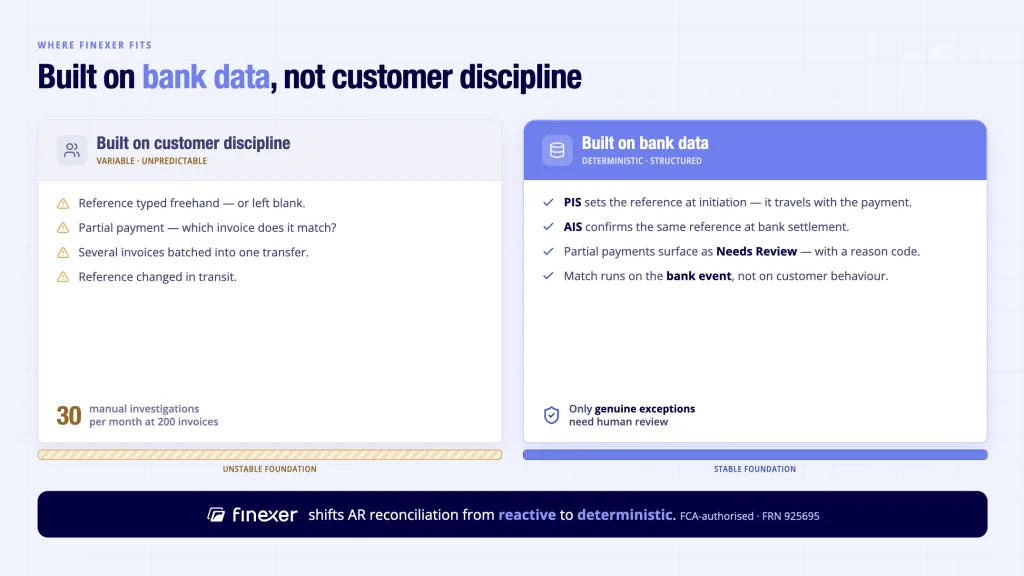
Finexer approaches this from the bank-data layer rather than from customer discipline. Here’s how it works through Finexer’s OB Invoice Tracker product:
- PIS payment events and AIS transaction data flow in from the connected receiving account.
- Webhook status updates fire as a payment moves from requested, payer-opened flow, to authorised, submitted, received, and matched.
- If a payment can’t be confidently matched, it enters a ‘Needs Review’ state with a reason code, like partial payment, amount variance, or missing reference, so finance users know exactly what to investigate.
- The client platform builds the matching logic and user workflow, while Finexer provides the regulated data and event layer underneath.
- Because a Pay by Bank request sets the payment reference upfront, the money arrives already carrying the detail needed to match it; here’s how Pay by Invoice actually works.
This kind of bank connectivity is now mainstream: Open Banking Limited reported 24.0 billion successful API calls in 2025, up 27% on the year before.
What that gives a platform, specifically:
- Real-time webhooks on payment and transaction events, no statement imports or polling
- AIS matching signals: invoice amount, reference, and connected payee account
- Exception states with reason codes (Needs Review) for the finance team action
- FCA-authorised (FRN 925695) as both AISP and PISP
- Almost all UK banks covered; transparent pricing
For teams handling invoice volumes where reconciliation becomes a headcount problem, this is the shift: matching powered by bank data, not customer discipline.
Conclusion
Invoice reconciliation isn’t a one-time task; it’s an ongoing process that underpins cash flow visibility and financial accuracy. AP invoice reconciliation is broadly manageable because you control the process. AR invoice reconciliation is harder because customer payment behaviour varies. Both benefit from automation, but AR especially benefits from a data-driven approach that works around variable customer behaviour rather than against it.
What is invoice reconciliation?
Most finance teams reconcile invoices by downloading bank statements, cross-referencing credits against open invoice lists, and manually updating the ledger. At low volumes this is manageable. As transaction count grows, each unmatched credit becomes a separate investigation – where the payer’s reference does not connect to an invoice number, and someone must work out which invoice the payment settles.
How do you reconcile invoices step by step?
The standard process is: capture the invoice or transaction, validate its details, match it to its counterpart, flag exceptions, investigate discrepancies, resolve and approve, record in your ledger, and report on match rates. Automated systems handle the first four steps quickly; investigation is where most time is spent. Reconciling invoices at scale requires either disciplined customer processes or matching logic powered by transaction data.
What happens when a payment can’t be matched?
Unmatched payments enter an exceptional state. This might be because the payment amount doesn’t match any outstanding invoice, the customer’s payment reference is unclear or missing, or the payment is partial. These exceptions require investigation: confirming the payer’s identity, checking for partial payments or refunds, reviewing outstanding invoices for amount matches, or contacting the customer to clarify.
If reconciliation is consuming disproportionate finance-team time, start with a conversation about your current process, your exception rate, and your team’s capacity. That clarity usually reveals the path forward, and if bank-data-led matching looks like part of it, Finexer’s team is happy to talk it through.
Invoice reconciliation that closes itself. Start with Finexer PIS and AIS.
Explore with AI
About the Author

Ravi Ranjan
Ravi Ranjan is Co founder & CEO of Finexer