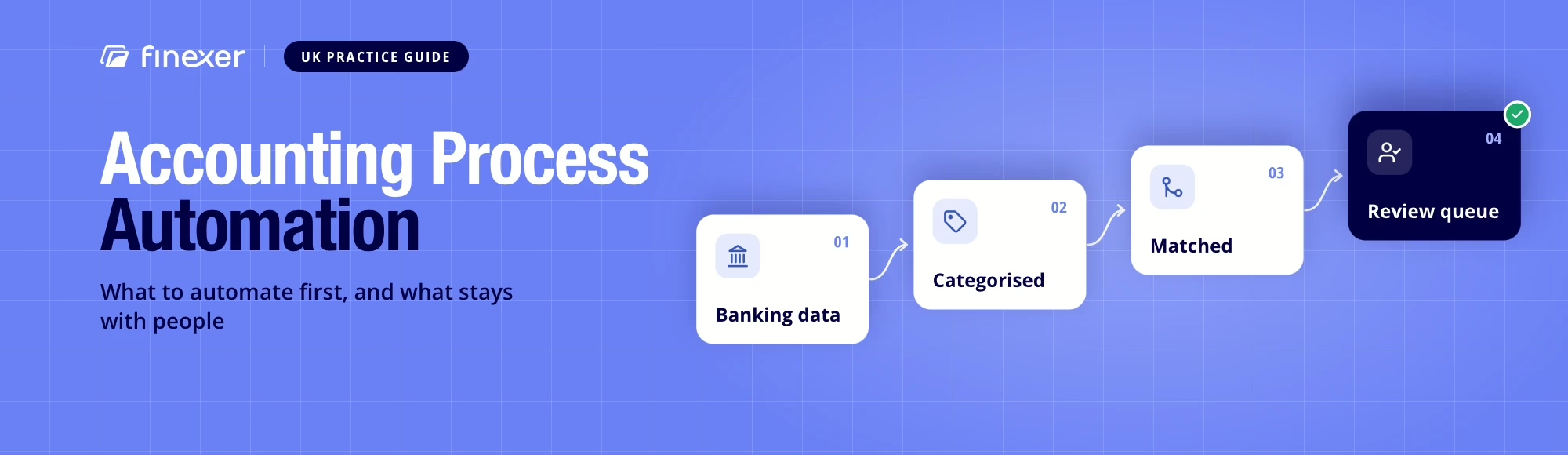
Automate the Data Layer First.
Real-time banking data with categorisation, ready to use.
Accounting process automation is the use of software to handle repetitive, rule-based accounting work, such as bank feeds, transaction categorisation, invoice capture and reconciliation matching, so that accountants spend their time on review and judgement.
A finance team can spend hours moving figures from statements into ledgers, checking descriptions, coding entries and matching payments. That work only gets records ready for review.
That is the core case for accounting process automation. The aim is not to remove accountants from the workflow. It is to move repetitive preparation away from them so that their attention goes to exceptions, judgement and client advice.
TL;DR: Accounting process automation works best when a task follows a repeatable rule and starts with reliable data. Bank feeds, transaction categorisation, invoice capture, coding and reconciliation matching can all reduce repetitive work.
The catch matters. Automation does not decide whether an unusual transaction is commercially correct, nor does it replace professional review. The workflow automates preparation and keeps people responsible for decisions.
This guide follows a practical test: automate work that is repetitive and rule-based, but keep judgement with the professional. That distinction matters more than the number of tasks a software product claims to automate.
Why does accounting process automation matter now?
Open Banking is no longer a niche mechanism behind fintech apps. Open Banking Limited’s figures for August 2026 show 42.03 million successful payments, up 1.9% on July, and 2.97 billion successful API calls. Since January 2018, Open Banking Limited reports more than one billion payments and over 100 billion API calls through the UK’s largest banks.
That scale matters because accounting systems increasingly depend on live financial information rather than periodic files. In Finexer’s own report, 27% of the 418 UK senior leaders surveyed said they spend 10 to 19 staff hours a month on manual payment administration, and 30% said they spend 30 or more.
For accounting firms, the practical question is which work to automate first.
Where does accounting process automation work today?
Strong candidates share three traits: frequency, predictable rules and clear inputs.
| Workflow | What automation can handle | Human role |
|---|---|---|
| Bank feeds | Pull account and transaction data into the accounting system | Review connection or data exceptions |
| Categorisation | Apply transaction categories using rules or enrichment | Check unusual or material items |
| Invoice capture | Extract fields and pass coding information onward | Approve ambiguous invoices |
| Reconciliation | Match transactions against expected entries | Resolve exceptions and judgement calls |
This is where automation starts to earn its keep. Staff stop downloading statements, reformatting files and copying descriptions before actual accounting work begins.
Accounting teams still need controls alongside accounting process automation. A large transfer can require context that software cannot infer.
That also explains why bookkeeping automation software should sit within a wider workflow rather than substitute for accounting judgement.
What should stay with people?
Good accounting process automation has boundaries: it should stop where judgement begins.
- Professional review remains important for:
- unusual transactions or unexpected amounts
- classification decisions with tax or reporting implications
- client questions and missing information
- adjustments requiring business context
- exceptions where matching confidence is low
This is a design principle. If a process cannot state its decision rule clearly, it may be a poor candidate for full accounting process automation.
The model is assisted accounting: software prepares the work and gives an accountant a review queue.
Why does bank access matter?
Accounting process automation cannot outrun its input.
If an accounting system still depends on emailed statements, downloaded CSV files or credentials entered into an automated browser flow, every downstream task inherits that dependency. A late or inconsistent feed can delay categorisation, reconciliation and reporting.
Open banking for accountants changes the access model. Under account information services (AIS), a customer consents to share account information with an authorised provider. The bank authenticates the customer and only then supplies account, balance and transaction data through an API.
That makes regulated API access the natural starting point, because every later step in the workflow depends on reliable data.
HMRC’s May 2026 policy paper states that automation tools must not be used to enter data into or access Government Gateway pages. The HMRC policy paper includes browser automation, screen scraping, scripted sign-in and robotic process automation in that description.
Finexer covers banking data only, so the point for this guide is narrower: screen scraping in accounting is becoming less attractive as a route to regulated services. Accounting platforms can instead build banking workflows on regulated Open Banking connections, which is the practical case for open banking for accountants.
What should a practice automate first?
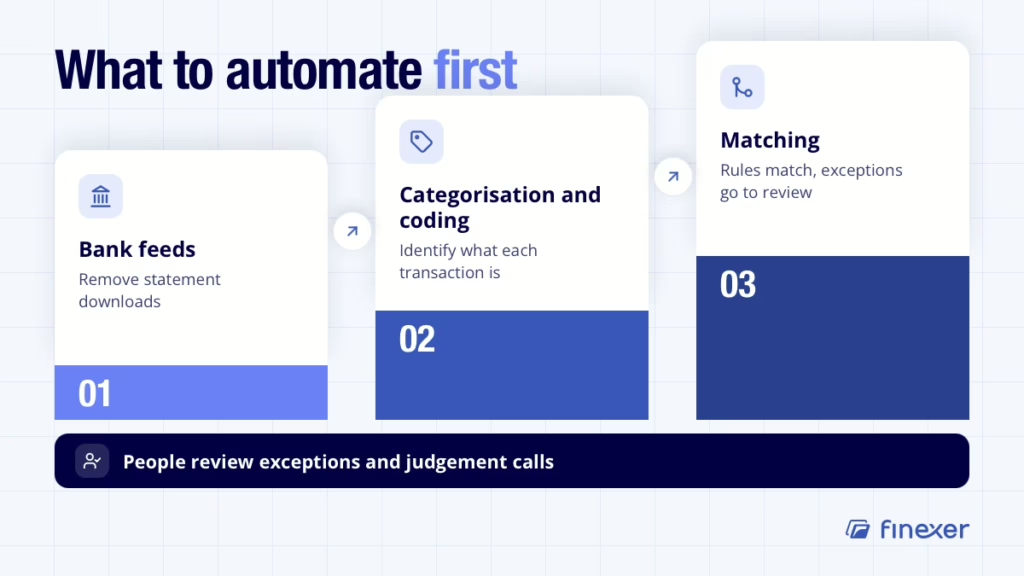
The order matters because each stage has a different payback.
1. Start with bank feeds
Remove statement downloads first. A reliable feed gives the accounting system a source of account and transaction data.
That is why bank feeds are often the first building block. Once transactions arrive consistently, other rules have something dependable to work with.
2. Add categorisation and coding
Next, reduce the manual work of identifying what each transaction represents. Merchant identification and categorisation can turn bank descriptions into information that accounting software can use more effectively.
The measure of success is how much review work remains after classification.
3. Automate matching
Once transactions arrive with categories, the automation of accounting process can turn reconciliation into a rules-based matching exercise.
Known invoices, recurring entries and expected payments can be matched automatically, while exceptions move to review.
The same principle holds at every stage: fix the flow of information first, then automate decisions that have clear rules.
What should accountants look for in banking data?
Not all feeds create the same downstream experience. When comparing Open Banking providers, ask whether data arrives in a form software can act on.
Look for:
| Requirement | Why it matters |
|---|---|
| Consistent account coverage | Practices manage clients across many banks and account types |
| Near-real-time access | Reviews do not have to wait for statement cycles |
| Clear merchant identification | Accountants can recognise transactions without decoding long references |
| Useful categorisation | Software has a stronger basis for coding and review |
| Consistent transaction fields | Matching rules work better with predictable inputs |
The distinction between source data and usable information matters. Transaction data can be accurate while still being written for bank systems rather than accounting workflows. Categorisation adds context.
Where does Finexer fit in the accounting workflow?
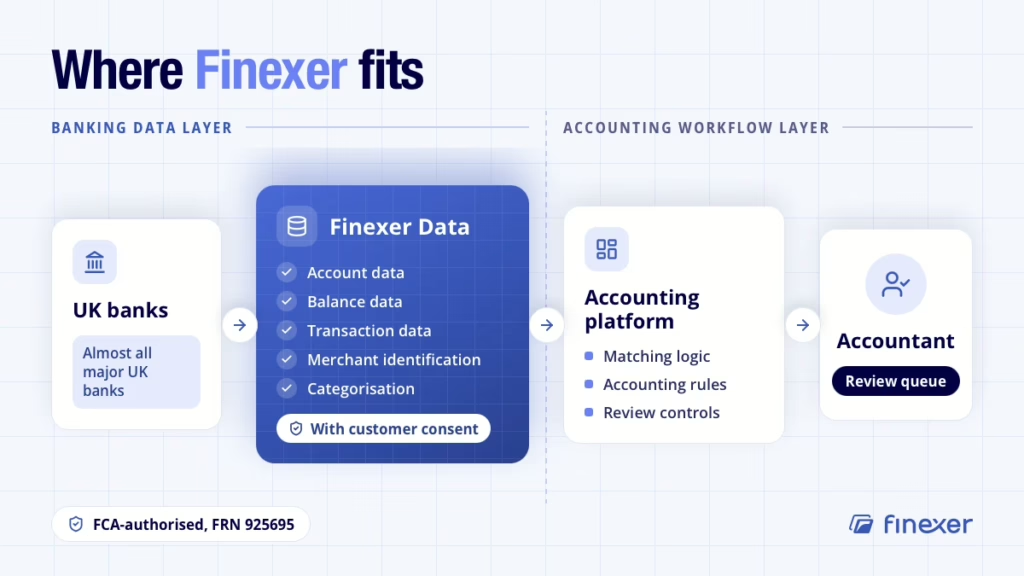
Finexer’s Data product supplies the banking data layer behind accounting platforms: account, balance and transaction data with merchant identification and categorisation, collected with customer consent.
Manual statement handling creates the bottleneck: the accounting platform cannot deliver accounting process automation until banking information reaches it in a usable form.
- For accounting and ERP platforms, relevant points are:
- Almost all major UK financial institutions covered
- Real-time banking data through Open Banking
- Account, balance and transaction data
- Merchant identification and transaction categorisation
- FCA-authorised infrastructure, FRN 925695
For a practice
When client account data arrives through a consistent, categorised feed, staff no longer need to download statements or reformat files before accounting work begins.
Merchant identification arrives with the transaction, so the team works from a review queue of categorised entries rather than unprocessed bank descriptions. Exceptions and unusual items move to a professional; routine entries move through without manual handling.
For an accounting or ERP platform
A platform building feeds, categorisation and matching on Finexer’s data layer has a consistent source of account, balance and transaction data across almost all major UK financial institutions.
Merchant identification and categorisation arrive with each transaction, giving the platform’s matching logic cleaner inputs to work with. The platform remains responsible for the matching rules, accounting workflow and the review controls it surfaces to professionals.
The product is infrastructure and not software for an accountant. Platforms build their accounting workflow and review controls on top of Finexer’s banking data API.
Does accounting process automation replace accountants?
No. Accounting process automation suits repetitive preparation, such as bank feeds, categorisation and reconciliation matching. Accountants still make professional judgements, handle exceptions, answer client questions and interpret information in context, so automation changes where their time goes rather than whether the practice needs them.
What is the difference between RPA and AI in accounting automation?
Robotic process automation (RPA) follows fixed, scripted steps, so it suits predictable tasks such as moving files or posting entries. AI-assisted categorisation handles classification where transaction descriptions vary. Many accounting workflows use both, and both depend on consistent input data, which makes the quality of the banking data layer more important.
How do I know whether an accounting process is ready to automate?
Test it against three questions. Does the task happen often, does it follow a rule you can write down, and are its inputs clear and consistent? Bank feed processing, reconciliation matching and invoice capture usually pass. Tasks that fail any of the three are better left with a professional, with software preparing the data for review.
Does accounting process automation create a better audit trail?
It can. A workflow that records what software matched or categorised, what a person reviewed and what was escalated for a decision gives a clearer record than manual processing usually does. That helps a practice show clients and auditors how its review process works, and where professional judgement was applied.
Automate the Data Layer First. See how Finexer supplies UK accounting platforms with real-time banking data and categorisation through regulated connections, so practices spend less time handling statements.
Explore with AI
About the Author

Clare Pearson
Clare Pearson is a senior payments professional with extensive experience across the global financial services and payments industry. She specialises in Open Banking, payment infrastructure, and financial technology transformation, with expertise spanning product delivery, operational strategy, regulatory compliance, and large-scale payments programmes. Clare currently serves as a Non-Executive Director at Finexer and a panel member for the Payment Systems Regulator (PSR), advising on the development of payment systems policy and innovation