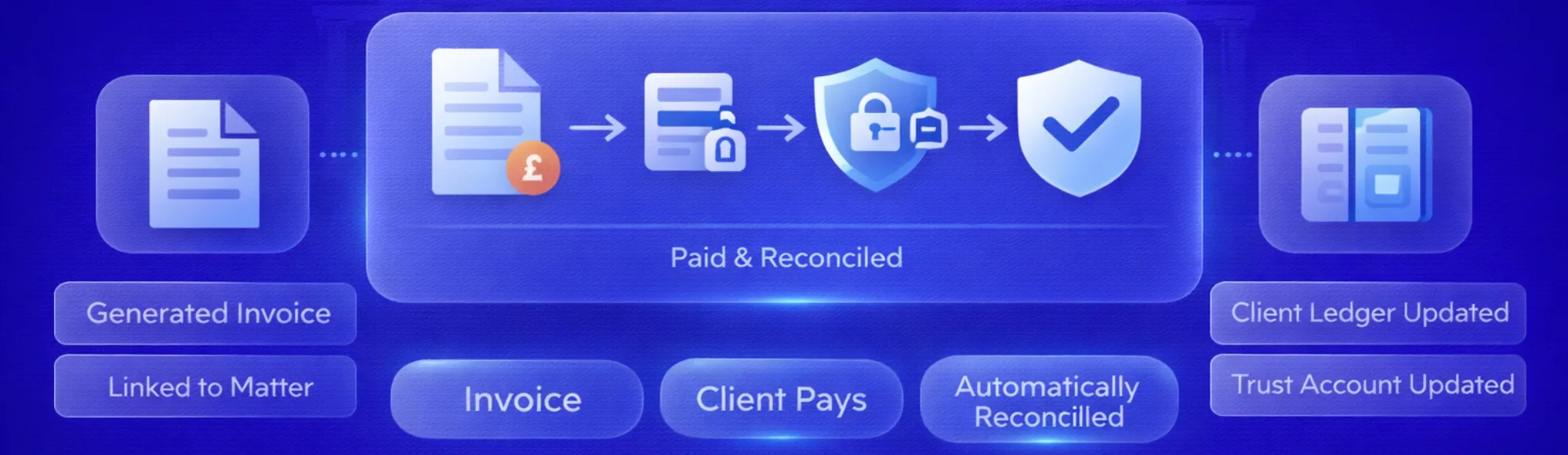
Let’s talk about something most law firm partners experience but rarely discuss openly: the payment chaos hiding behind your professional facade. Law firm payment automation solves this. Right now, someone in your office is probably updating a spreadsheet, trying to figure out which client payment corresponds to which matter. Another person is drafting yet another polite reminder email for an invoice that’s three weeks overdue.
Your finance team didn’t sign up to be payment detectives. Yet here they are, spending half their Tuesday matching cryptic bank references like “PMT REF 847” to actual client files. Meanwhile, your case management system shows one version of account balances, your banking app shows another, and your accounting software? That’s showing last week’s numbers because nobody’s had time to update it.
Law firm payment automation fixes this by turning your fragmented payment process into a single connected system. That invoice someone generated this morning? It’s already linked to a secure payment method. When your client pays, every system updates automatically. Your team stops playing detective and starts doing the work they were actually hired for.
Why Your Current Payment System Creates Hidden Costs
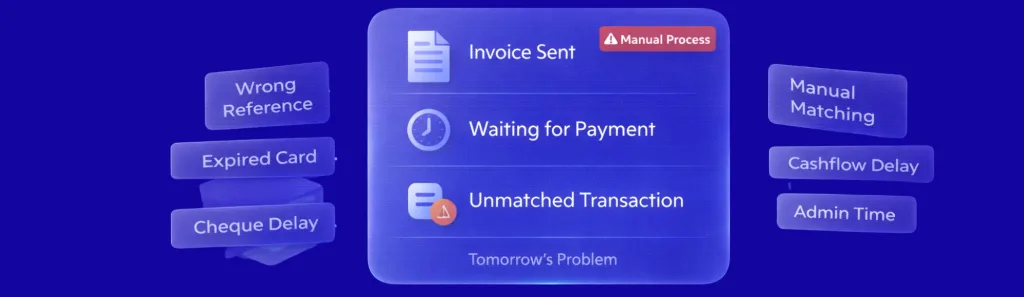
Walk through a typical payment cycle at your firm. A conveyancing matter completes. Someone-probably already juggling six other tasks-generates the final invoice. Maybe it goes through your practice management system. Maybe someone’s still using Word templates. Either way, it heads to the client via email or post.
Now comes the waiting game. And the problems:
- Clients transfer money but forget your reference number (or use their own creative version)
- Card payments fail because the details saved from last year’s matter have expired
- Cheques arrive but sit in someone’s desk drawer until the Friday bank run
- Your bookkeeper spends an hour every morning playing “match the payment” with your bank statement
- Every unmatched transaction becomes tomorrow’s problem, then next week’s headache
The real issue isn’t that clients won’t pay. You’re losing time and cash flow because your payment process belongs in 2010. Your clients manage their entire lives through apps that work instantly. Then they encounter your firm’s payment system and wonder if they’ve stepped through a time portal.
What Actually Changes With Law Firm Payment Automation?
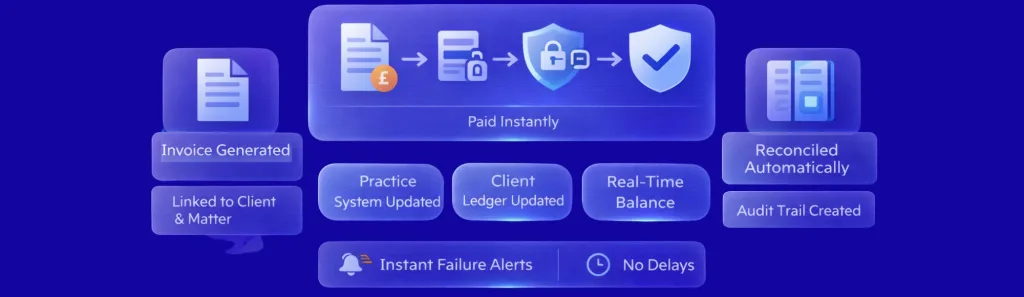
Imagine your billing process as a relay race where every handoff currently requires someone stopping, checking paperwork, and manually passing the baton. Law firm payment automation and legal payment automation software for law firms remove those stops. The invoice generation triggers payment link creation automatically. That payment link knows exactly which client, which matter, which account.
Your client receives a secure link. They click it. Their bank authenticates them directly-no need to enter card details or remember account numbers. The payment processes instantly.
Real-time visibility means:
- Your practice management system updates the instant payment clears
- Client ledgers reflect the payment without anyone touching a keyboard
- Failed payments notify you immediately, not three days later when someone finally checks
- Your accounts show accurate balances right now, not “as of last Friday”
- Compliance audit trails generate automatically because every action logs with timestamps
Explore how open banking enables secure law firm payments
Think about month-end close right now. Someone’s working late reconciling statements against ledgers, investigating discrepancies, updating records. Law firm payment automation and payment processing software for law firms make that person’s life dramatically easier. When payments reconcile continuously, month-end becomes a quick review rather than a reconstruction project.review rather than a reconstruction project.
How Does This Differ From What You’re Doing Now?
Your current setup probably involves three or four disconnected systems that don’t talk to each other. Invoice here. Payment there. Accounting somewhere else. Someone-usually someone expensive-spends hours being the human API connecting these systems.
Law firm client payment automation treats your entire payment workflow as one process. Generate an invoice? Payment link created automatically. Client pays? Every connected system updates simultaneously. Your team handles exceptions only-the unusual cases requiring human judgement-not every single routine transaction.
A practical difference that matters for trust accounting: Traditional methods mean reconciling trust accounts involves downloading statements, manually matching transactions, updating ledgers. You’re working with yesterday’s data at best. Automated systems reconcile continuously. Your trust account balances stay current. Your compliance risk drops because you’re not discovering problems during quarterly reviews-you’re catching them immediately.
Manual vs Automated Payment Processing: What Changes?
| Process Step | Manual Method | With Law Firm Payment Automation |
|---|---|---|
| Invoice Generation | Created in practice management system, sent separately | Automatic generation with embedded payment link |
| Payment Collection | Bank transfer, card, or cheque with manual reference | Direct bank authentication through secure link |
| Payment Matching | Manual reconciliation against invoices (30–60 mins daily) | Automatic matching to matter and client (instant) |
| Failed Payments | Discovered days later during reconciliation | Immediate notification with retry options |
| Trust Account Updates | Manual ledger entries with separate reconciliation | Automatic posting to correct client ledger |
| Month-End Close | 2–3 days reconciling statements and resolving discrepancies | Few hours reviewing exceptions only |
See how law firm payment automation integrates with legal technology
The difference between storing card details versus bank authentication matters more than most firms realise. Stored cards expire. People cancel them. Details change. Every failed card payment means someone must chase the client for updated information. Bank authentication happens fresh each time-no storage, no expiry, no outdated information.
What Should You Actually Look for When Choosing Payment Automation?

Bank coverage sounds boring until you realise partial coverage means you’re still maintaining backup payment methods. If your automation only works for 60% of clients, you haven’t automated-you’ve just added another system to manage. Legal payment automation software for law firms needs to cover the banks your clients actually use, not just the popular ones.
Integration requirements that actually matter:
- Does it talk to your current practice management system without manual exports?
- Can it handle separate client and office account postings automatically?
- Does it understand UK trust accounting rules (because yes, they’re different)?
- Will it update all your systems simultaneously, or will someone still be copy-pasting data?
- Can you see everything in real-time, or are you still working with yesterday’s numbers?
Pricing models reveal a lot about whether a provider understands law firms. Fixed fees assume consistent transaction volumes. But your billing isn’t consistent-conveyancing peaks at tax year end, litigation has lumpy payment patterns, corporate work follows deal cycles. Usage-based pricing that scales with actual transaction volume makes significantly more sense than guessing capacity six months ahead.
Real-time reconciliation isn’t a nice-to-have for trust accounts. When client money sits in accounts requiring separate ledgers, batch processing that reconciles overnight creates compliance gaps. The SRA doesn’t care that “it’s only a few hours.” Continuous reconciliation means your records match reality constantly, not eventually.
How Finexer Actually Solves These Problems
Finexer covers 99% of UK banks through open banking connections. Not “most of the popular ones”-virtually all of them. This matters because that one client using a smaller building society for their conveyancing funds? They can pay the same way as everyone else. No special handling. No backup methods.
Learn how automated systems accelerate client onboarding
We provide dedicated onboarding support for 3-5 weeks. That’s not because our system is complicated. It’s because your firm’s payment workflow is unique. You’ve got specific trust accounting requirements. Your practice management system connects to your accounts in a particular way. That support ensures payment processing software for law firms fits your actual processes rather than forcing you to change everything to match generic workflows.
What firms tell us changes after implementing automation:
- Payment admin time drops by up to 90% (actual measured time, not estimates)
- The person who used to spend mornings matching payments now focuses on case work
- Month-end close shifts from multi-day drama to same-day review
- Failed payments get handled immediately instead of accumulating into problems
- Partners can see real cash position anytime, not just after reconciliation marathons
Pricing works on what you actually use. Quiet month? Lower costs. Busy quarter with multiple completions? Costs scale with your activity. For firms experiencing seasonal variations-and nearly every practice has some seasonal pattern-this approach means your software costs track your revenue cycles rather than requiring you to guess annual volumes.
The platform integrates with your existing trust accounting requirements. Separate client and office ledgers. Automatic posting to correct accounts. Compliance audit trails that the SRA actually accepts. These aren’t add-ons or special features-they’re built into how the system works because it’s designed for UK legal practices, not adapted from generic payment software.
What is law firm payment automation?
Software that connects invoice generation, client payment processing, and account reconciliation into a single automated workflow without manual intervention for routine transactions.
How does legal payment automation software integrate with practice management systems?
Through API connections that automatically sync invoice data, payment status, and ledger updates between your case management, billing, and accounting systems.
What makes payment processing software specific to law firms?
Integration with trust accounting requirements, client-matter accounting structures, and compliance with Solicitors Regulation Authority rules for client money handling.
Can law firm client payment automation handle trust account transactions?
Yes-systems designed for legal practices include separate ledger handling for client funds and office funds with appropriate reconciliation controls.
How does this differ from standard merchant payment services?
Direct bank authentication through open banking rather than stored card credentials, automatic reconciliation with matter-specific accounting, and integration with legal practice management workflows.
Ready to Automate Your Firm’s Payment Processing?
See how Finexer reduces payment admin by up to 90% whilst maintaining complete audit trails
Book Demo NowAbout the Author

Ravi Ranjan
Ravi Ranjan is Co founder & CEO of Finexer